The DYNABEAT with a second hour hand showing two time zones at once. Three assemblies had to change to make room for it, and the clutch that sets the difference lives inside the dial assembly.
ElectricCalendarTwo Time ZonesUniversal Hand
Model 265 · Dial Side & Movement Side
Ligne9¾ × 12 (cover) · 9¾ × 12¾ (text)
Dimensions22.1 by 28.7 mm
Basic movementModel 253
Beat28,800 per hour
ClutchIn the dial assembly
ManualService Manual · Model 265
Two Zones on the DYNABEAT
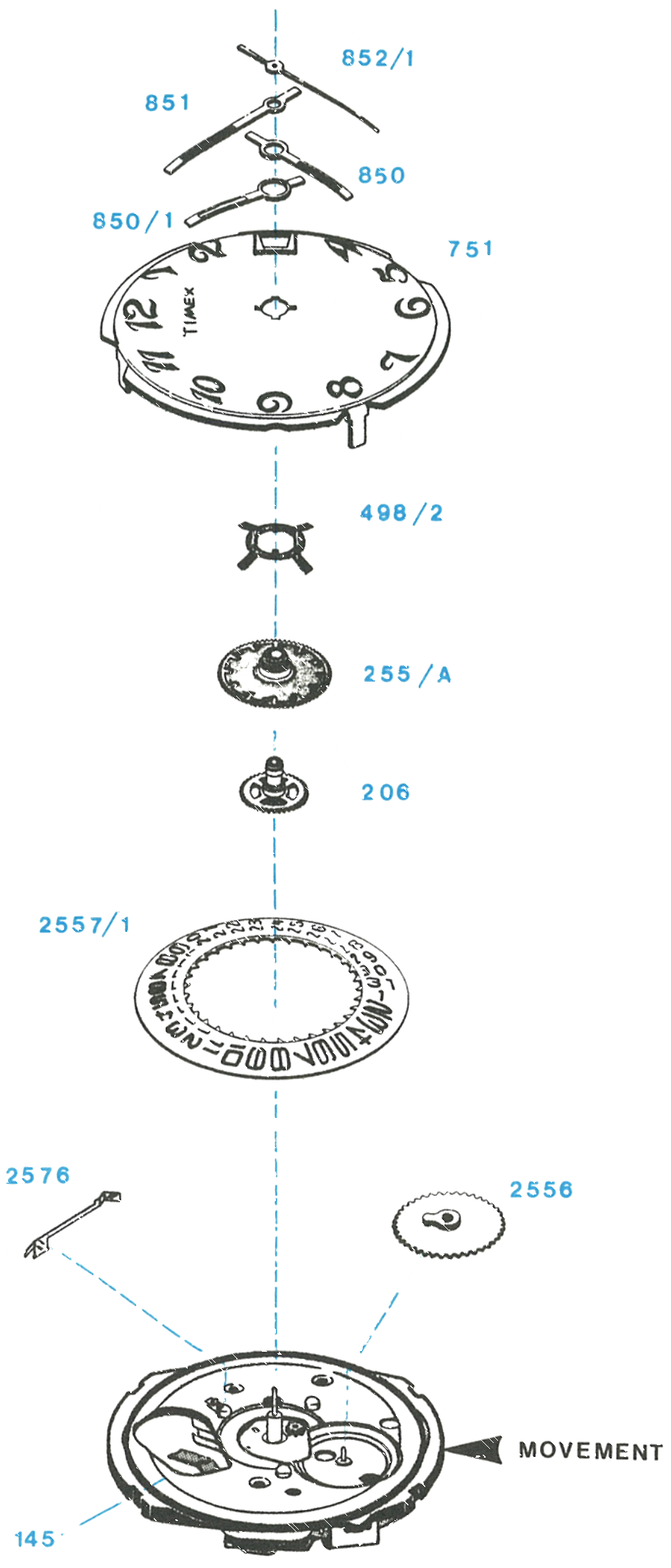
The Timex Model 265 is a high frequency electric calendar movement with the added feature of a second hour hand to show the time in two zones simultaneously. The basic movement is similar to the Model 253, but with the minute wheel assembly, seconds wheel assembly and dial rest changed to permit the second hour hand.
Setting the zone difference: The time difference between the two hour hands is set while rotating the hands counterclockwise, and the universal hand stops at the first hour mark. The actual time is then set by rotating the hands clockwise.
Where the clutch is: The mechanism which permits setting the time difference is contained in the dial assembly, not in the movement.
The calendar may be changed by rotating the hands either forward or backward through 24 hours for each date change. For the basic movement, see the Model 253 guide.
Exploded View
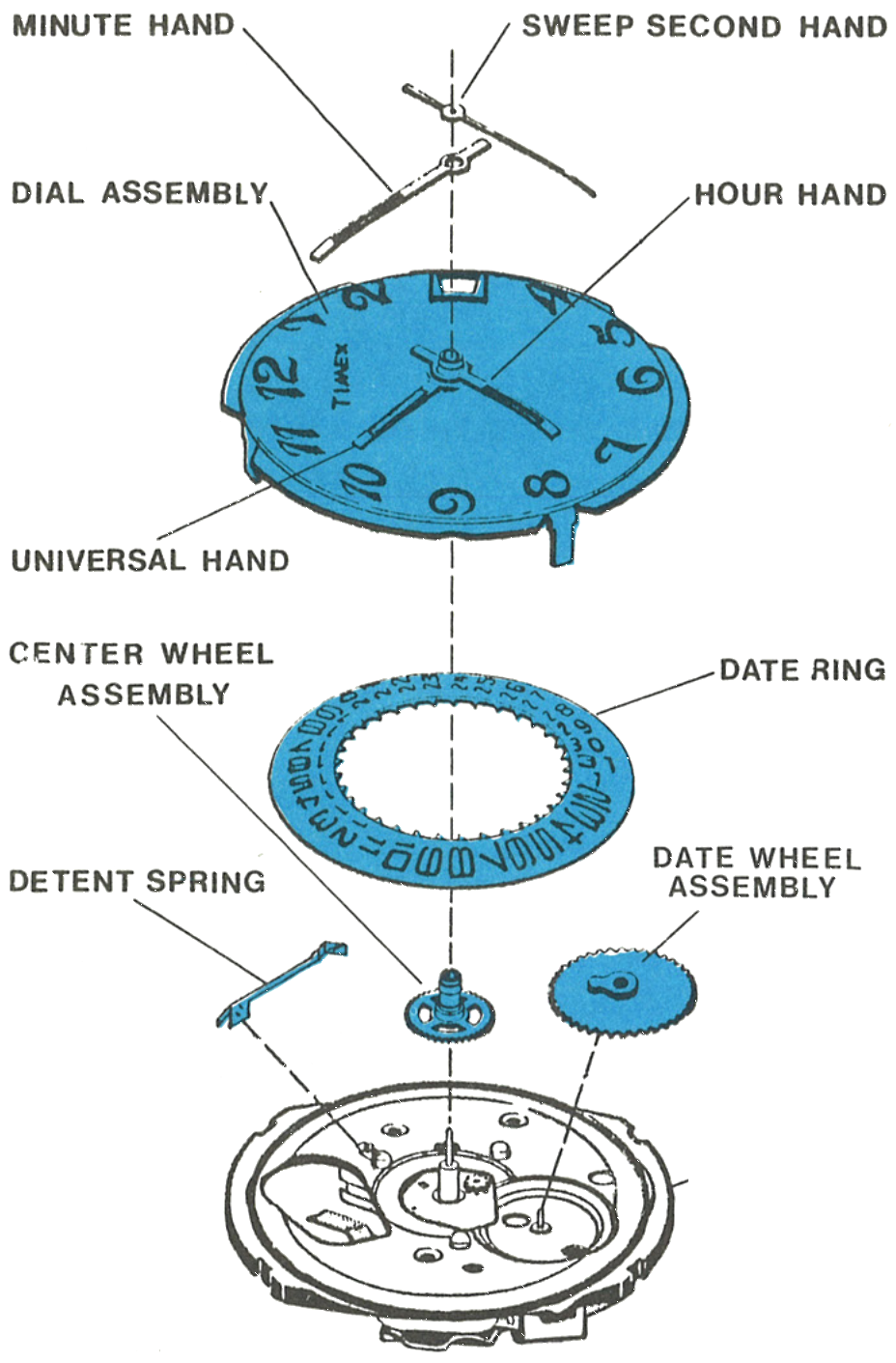
The universal hand at 850/1, the hour wheel assembly at 255/A and the hour wheel detent washer at 498/2 are what the zone time feature adds.
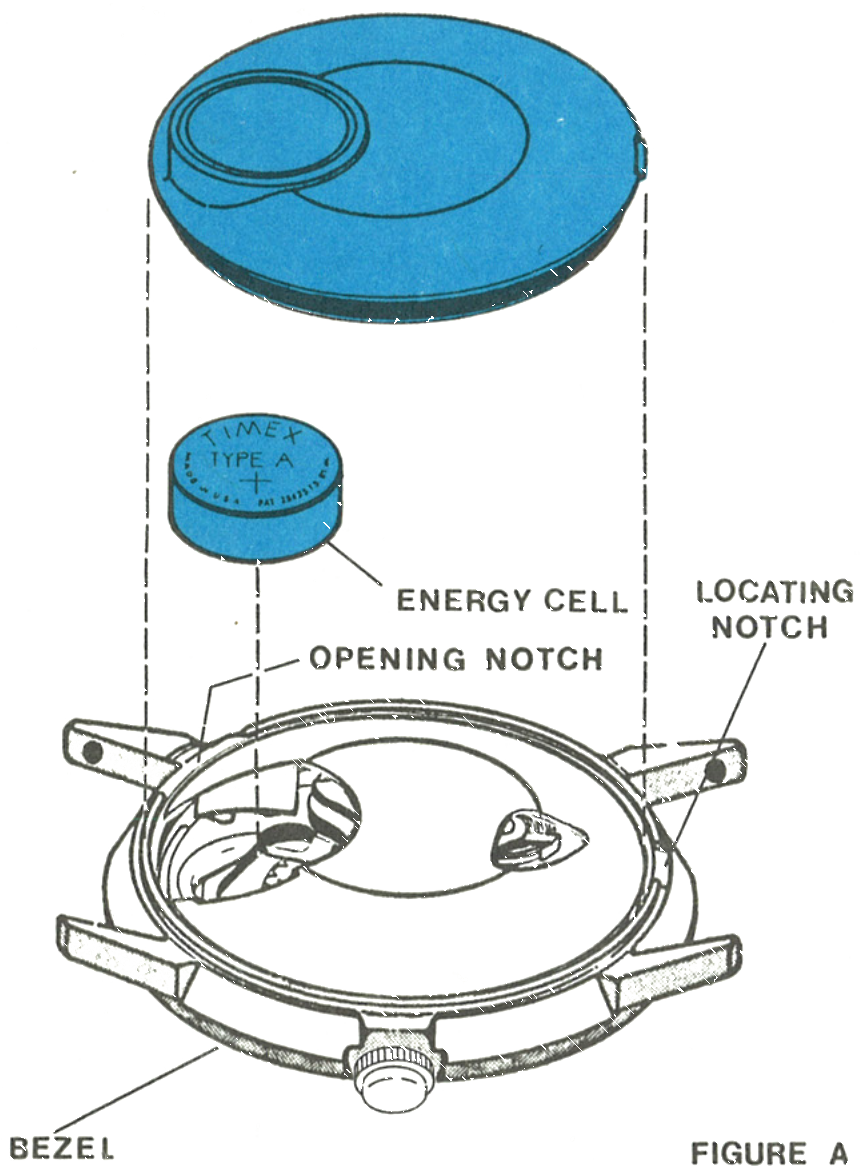
Insert a blade into the opening notch on the bezel and pry the caseback off. The locating tab on the caseback is used for orientation of the back during reassembly.
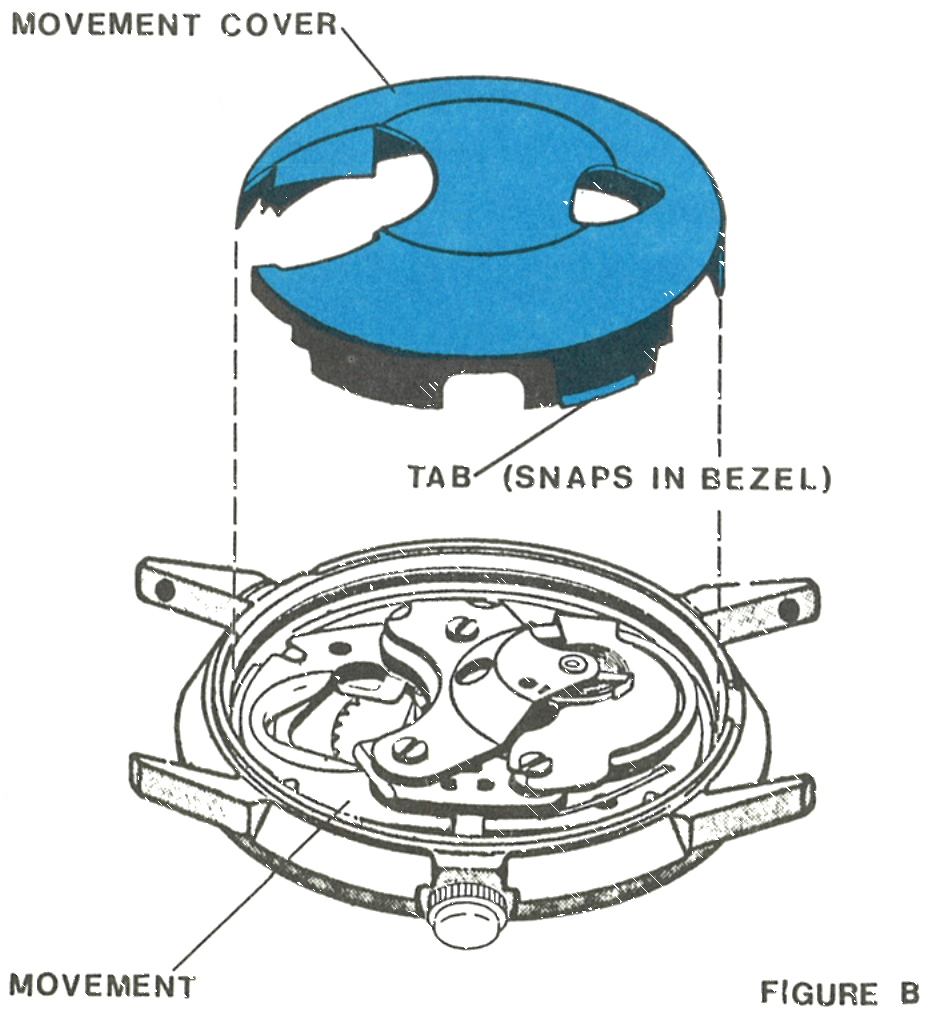
Remove the energy cell, then lift off the movement cover. The cover is held in place by two tabs which snap into recesses in the bezel.
Note: Any energy cell with a voltage of less than 1.5 volts, or one in service in excess of one year, should be replaced. Use of an energy cell not meeting Timex specifications may cause the watch to malfunction.
Fig. 265.3 · Figure A
2 · The Movement Cover
The cover and the tab which snaps into the bezel, with the movement beneath.
Fig. 265.3 · Figure B
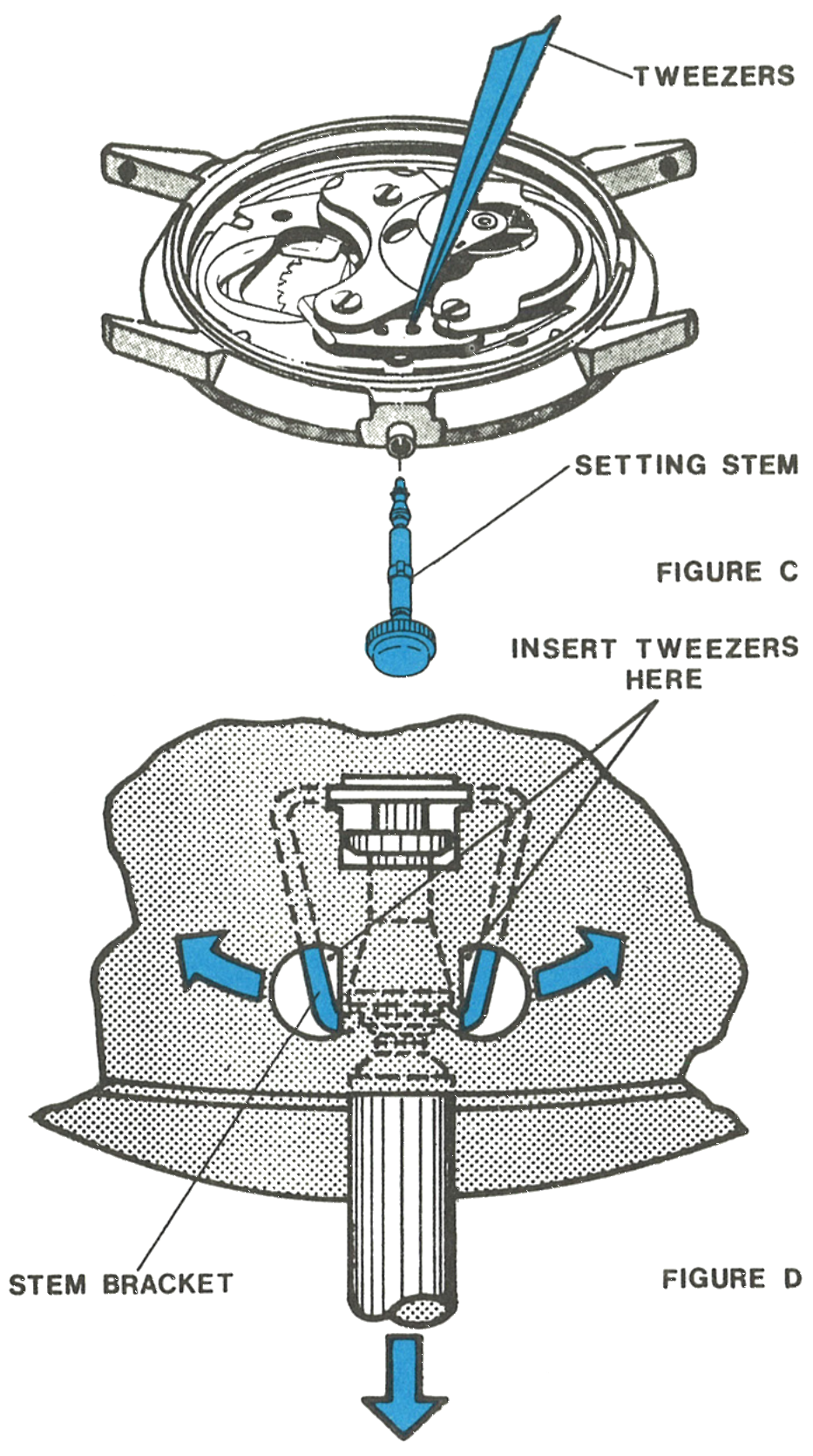
3 · Releasing the Stem
The stem is held in position by the stem bracket. Pull the stem out into the set position and continue to maintain a slight outward pull.
Place the points of a heavy tweezer into one side of the stem bracket and push the bracket aside to release one side of the stem. Continue to pull the stem outward and use the tweezer points to release the other side. The stem will now pull free of the movement and case.
Fig. 265.4 · Figures C and D
4 · Out Through the Crystal
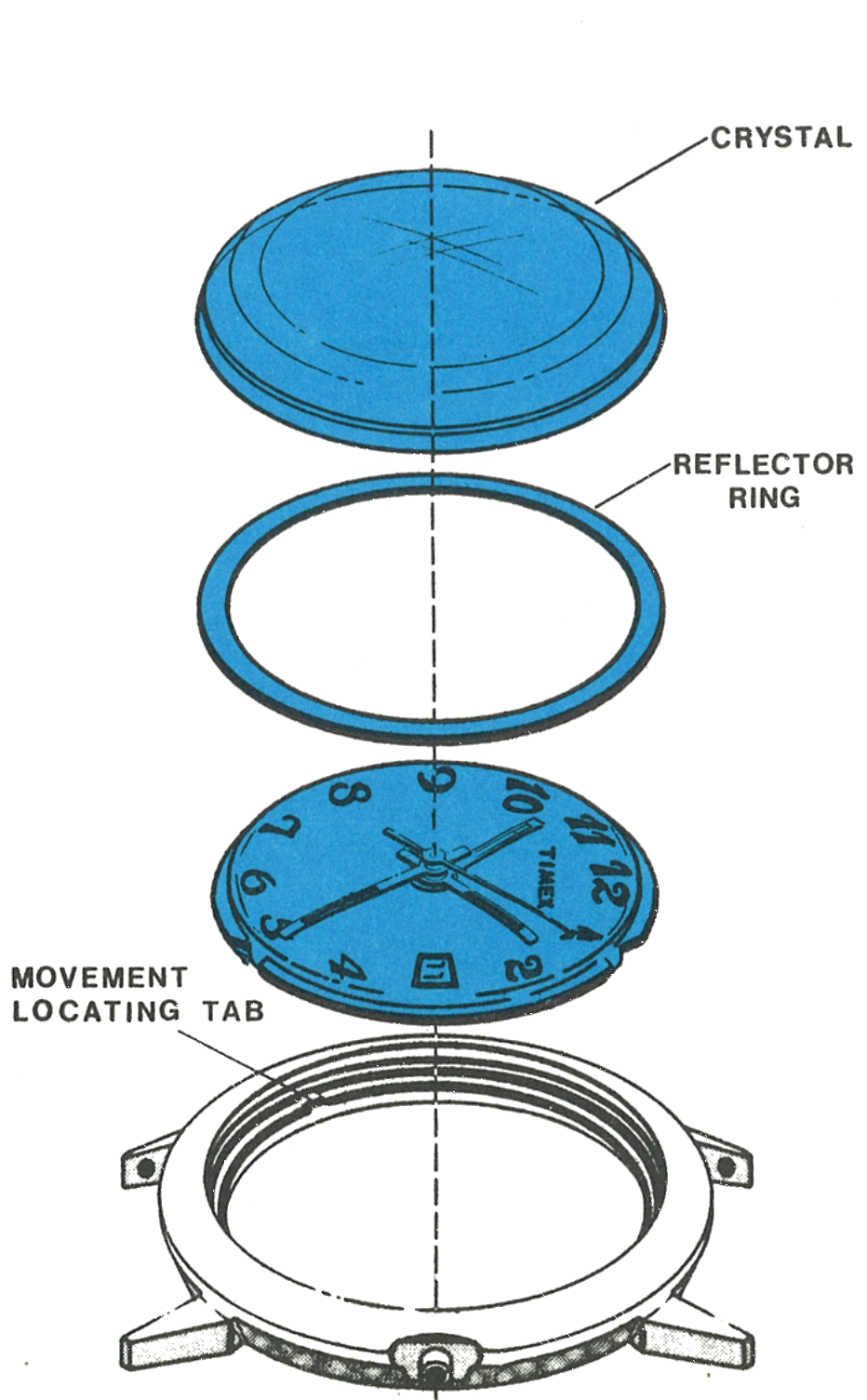
After the stem is removed, the movement can be removed through the crystal side of the case. Remove the crystal with a crystal seating tool and then lift the reflector ring and movement free of the case.
Note: Note the position of the movement locating tabs inside the bezel. Tabs should align in the notches of the plate when reassembling.
Fig. 265.4 · Figure E
5 · The Dial Assembly
Remove the sweep second hand and minute hand.
Straighten four tabs sufficiently to release the dial from the movement while holding the dial in place.
Turn the assembly over and lift off the dial assembly. Note the position of parts under the dial.
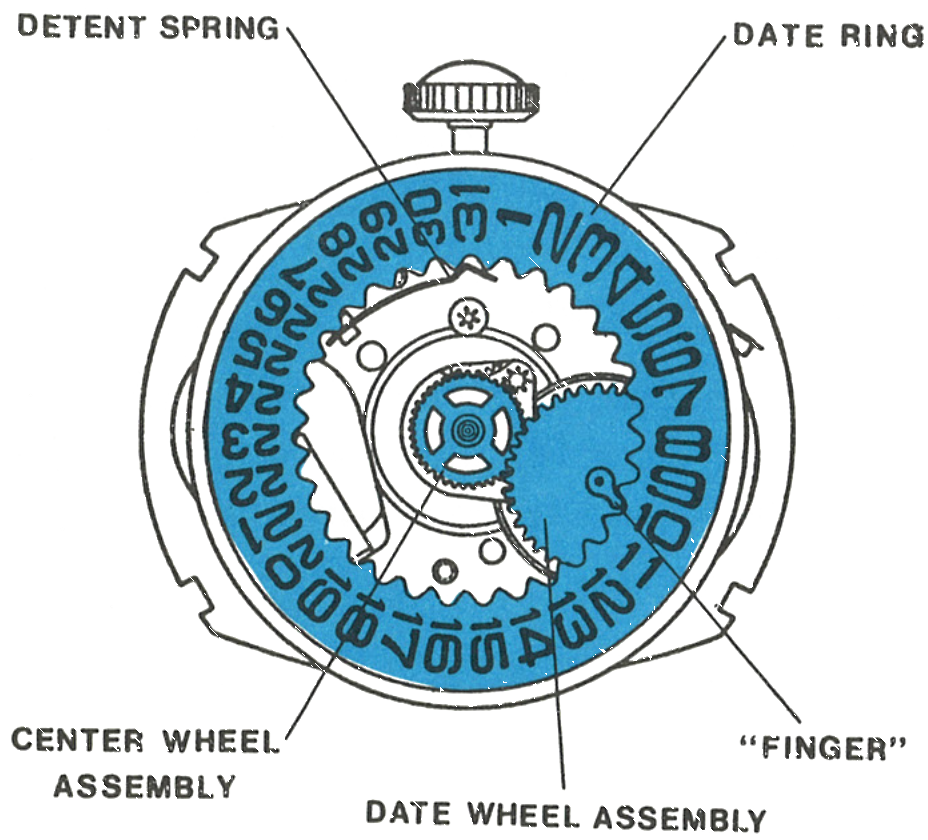
Lift off in order: the date ring, and the detent spring will move over; then the date wheel assembly; then the center wheel assembly.
Note: The clutch mechanism which permits setting the time difference between the hour hands is contained in the dial assembly.
Fig. 265.5 · Figure F
6 · Under the Dial
The detent spring, date ring, centre wheel assembly, date wheel assembly and the finger which drives the date ring.
7 · The Centre and Date Wheel Posts
Fig. 265.5 · Figure G
Cleaning & Lubrication
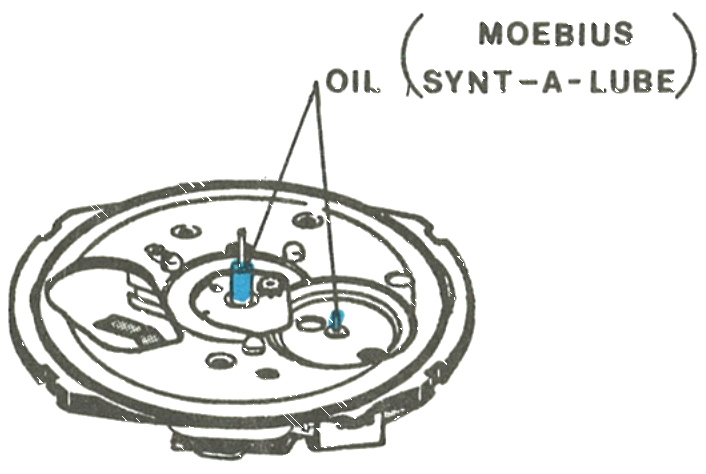
The basic movement, with hands and dial removed, is disassembled, cleaned and lubricated as detailed for the Model 253. The Model 265 requires lubrication in addition to that applied in the basic movement.
Caution: Extreme care must be exercised when cleaning cases, dials, hands and special rings which may contain materials other than metal, because paint, lacquer and plastic finishes may be damaged by standard cleaning solutions.
1 · A · The Posts
Fig. 265.6 · Figure H
2 · The Date Ring and Detent Spring
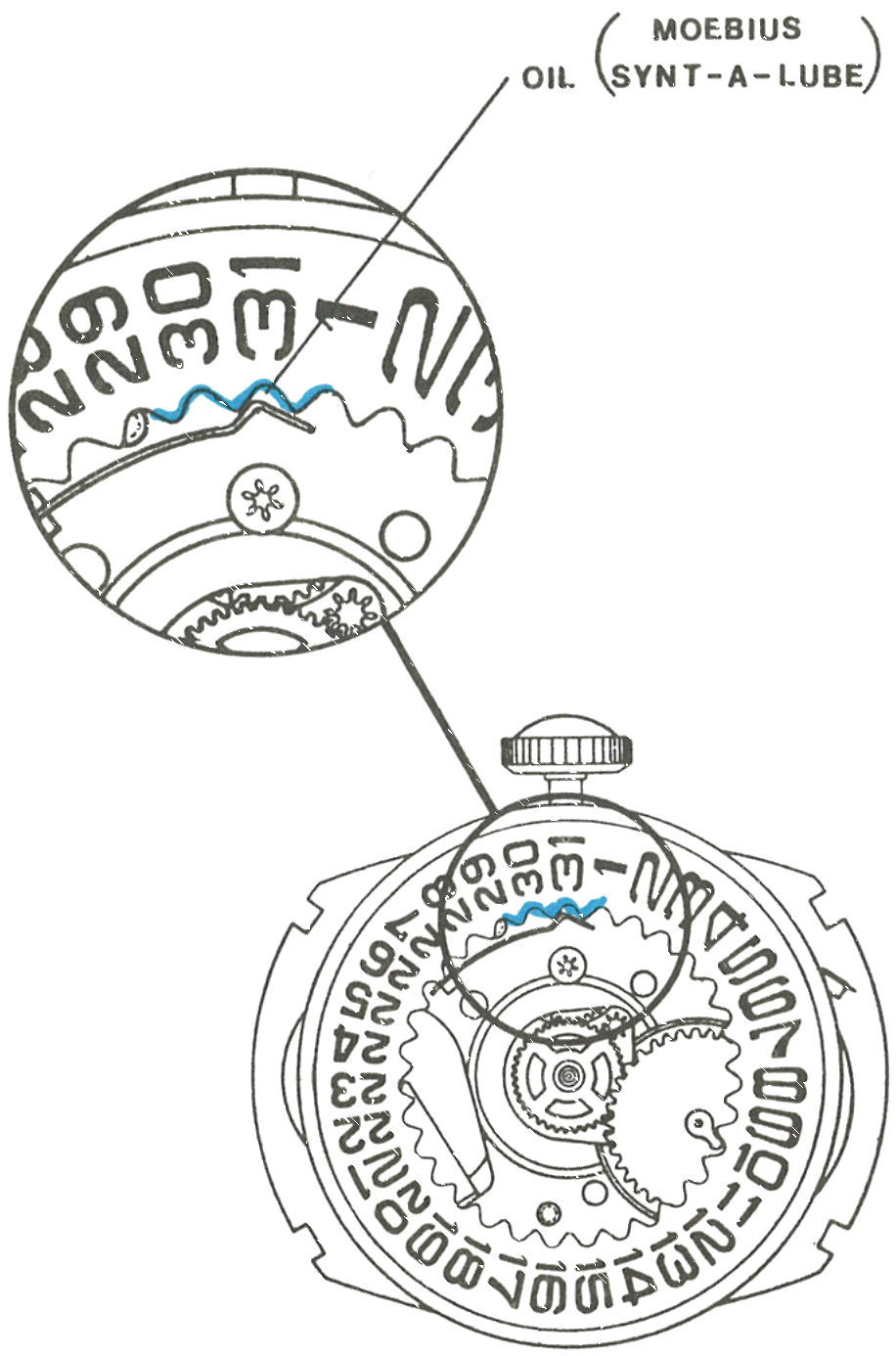
During reassembly, apply non-spreading watch oil to three teeth of the date ring and at the end of the detent spring where it engages the date ring.
The dial rest has been coated with a solid film lubricant and needs no further lubrication.
3 · Assembling the Hands
Turn the crown so the hands rotate counterclockwise and check that the zone hand stops exactly on an hour mark. Turn the hands clockwise and check that the date starts to change at 12 o’clock.
Set the hour hand at the 12 o’clock position and press on the minute hand and second hand. Be sure the sweep hand is below the chamfer on the top of the staff.
Remove the crown and stem. Place the assembly in the bezel, making certain the tabs in the bezel engage the slots in the dial plate.
Place the reflector ring on top of the dial and replace the crystal.
Insert the stem through the bezel and push into place in the movement with a turning motion.
Replace the movement cover, put in the energy cell and replace the back, being sure to align the locating tab in the notch in the bezel.
Push the crown into the run position and the watch will start immediately. If not, slight finger agitation may be necessary.
Fig. 265.6 · Figure J
Reassembly
Insert the crown and stem assembly in the movement and push in while rotating to engage the bracket.
Position the center wheel assembly on the center post and engage with the pinion teeth.
Place the date wheel assembly on its post with the finger positioned as shown in figure F.
Replace the detent spring in the dial rest if it has come loose during cleaning and handling.
Centralise the date ring on the dial rest and use the point of a tweezer to deflect the detent spring to engage the teeth of the date ring, lubricating as noted above.
Place the dial assembly on the movement so the window is in line with the stem, the hour hand is at 11 o’clock and the tabs are aligned in the slots of the dial plate.
Hold the dial in place, turn the assembly over and bend the tabs to hold the dial in position.
1 · A · Insert the crown and stem assembly and push in while rotating to engage the bracket2 · B · Position the center wheel assembly on the center post and engage with the pinion teeth3 · C · Place the date wheel assembly on its post with the finger positioned as shown in figure F4 · D · Replace the detent spring in the dial rest if it has come loose5 · E · Centralise the date ring and deflect the detent spring with a tweezer point to engage its teeth, lubricating as noted above6 · F · Place the dial assembly so the window is in line with the stem, the hour hand at 11 o’clock and the tabs aligned in the slots7 · G · Hold the dial in place, turn the assembly over and bend the tabs
Assembling the hands:
8 · H · Turn the crown so the hands rotate counterclockwise and check the zone hand stops exactly on an hour mark. Turn clockwise and check the date starts to change at 12 o’clock9 · I · Set the hour hand at 12 o’clock and press on the minute hand and second hand, the sweep hand below the chamfer10 · J · Remove the crown and stem. Place the assembly in the bezel, tabs engaging the slots in the dial plate11 · K · Place the reflector ring on top of the dial and replace the crystal12 · L · Insert the stem through the bezel and push into place with a turning motion13 · M · Replace the movement cover, put in the energy cell and replace the back, aligning the locating tab in the notch14 · N · Push the crown into run and the watch will start immediately
Cells: Use of an energy cell not meeting Timex specifications may cause the watch to malfunction. Do not dispose of an energy cell in fire.
This guide is based on the original Timex factory service manual for the Model 265 movement.