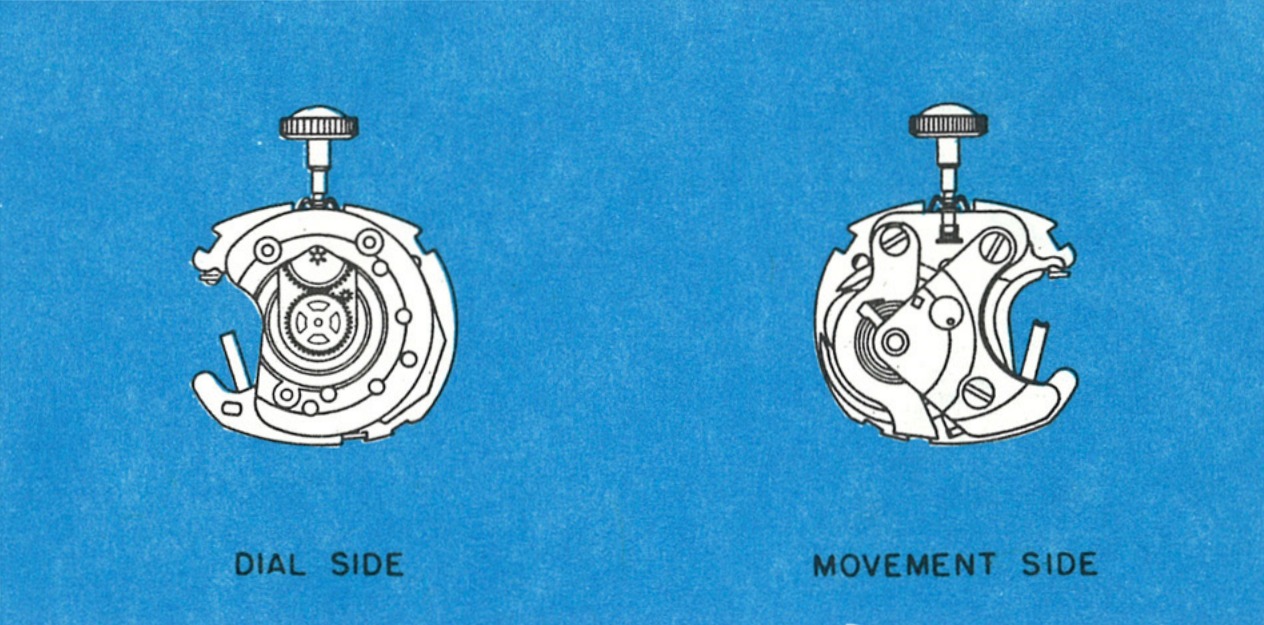
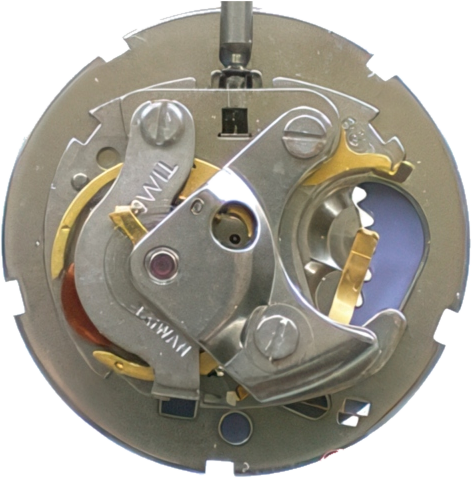
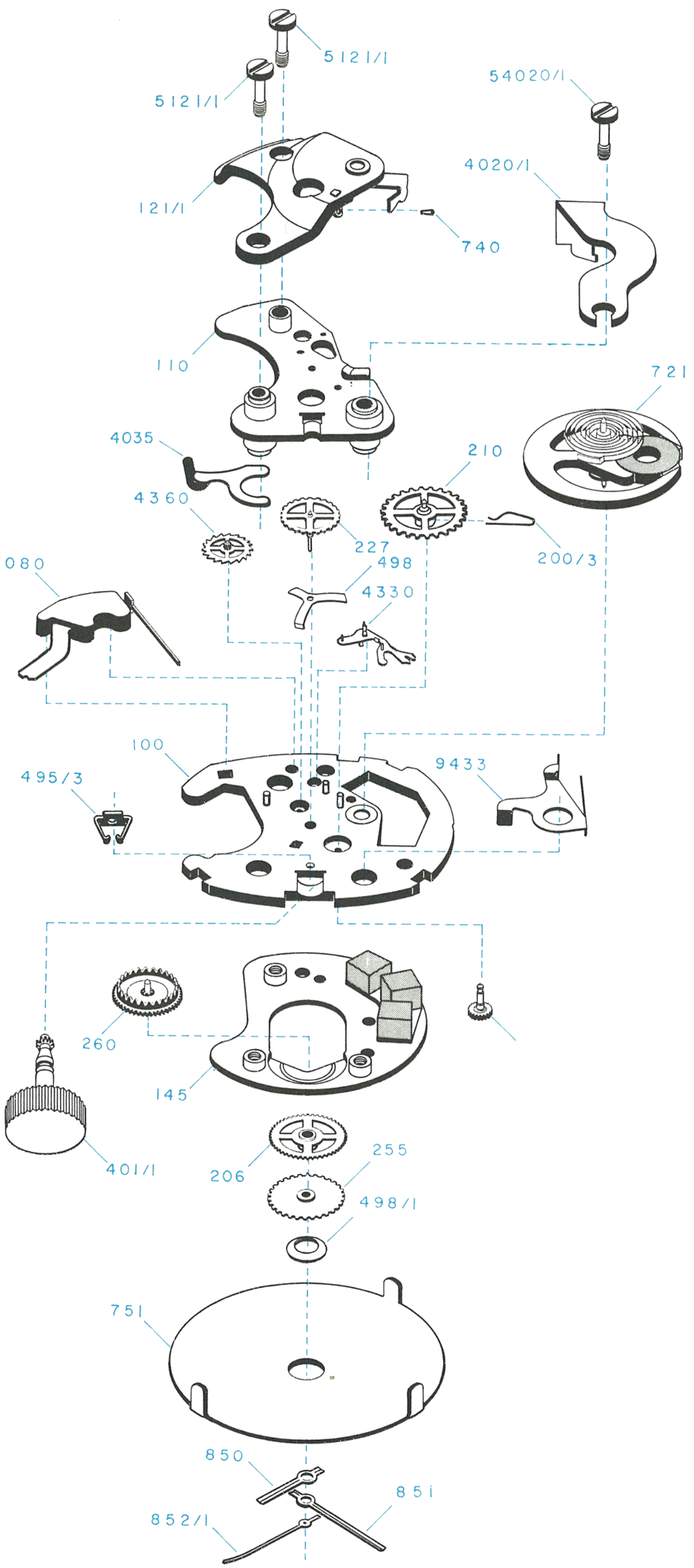
The hands are set in the normal method, pulling out and rotating the crown. The Model 69 incorporates a device which stops the balance oscillation when the crown is in the set position, and in that position the flow of current is interrupted so the cell is not being discharged.
The Timex electric has an hourly beat of 21,600. The large balance has a temperature compensated hairspring and the rate can be adjusted in the usual way by moving the regulator. It can be checked in all positions on a normal watch rate recorder, and dismantled and repaired with conventional tools. For checking the energy cell voltage, a high ohm volt meter of about 20,000 ohms per volt is sufficient.
The Timex Model 69 is a 6¾ x 8 ligne electric watch movement. The power to drive the movement is supplied by a miniature energy cell. Power from the energy cell drives the balance, the balance drives the time train which, in turn, rotates the hands.
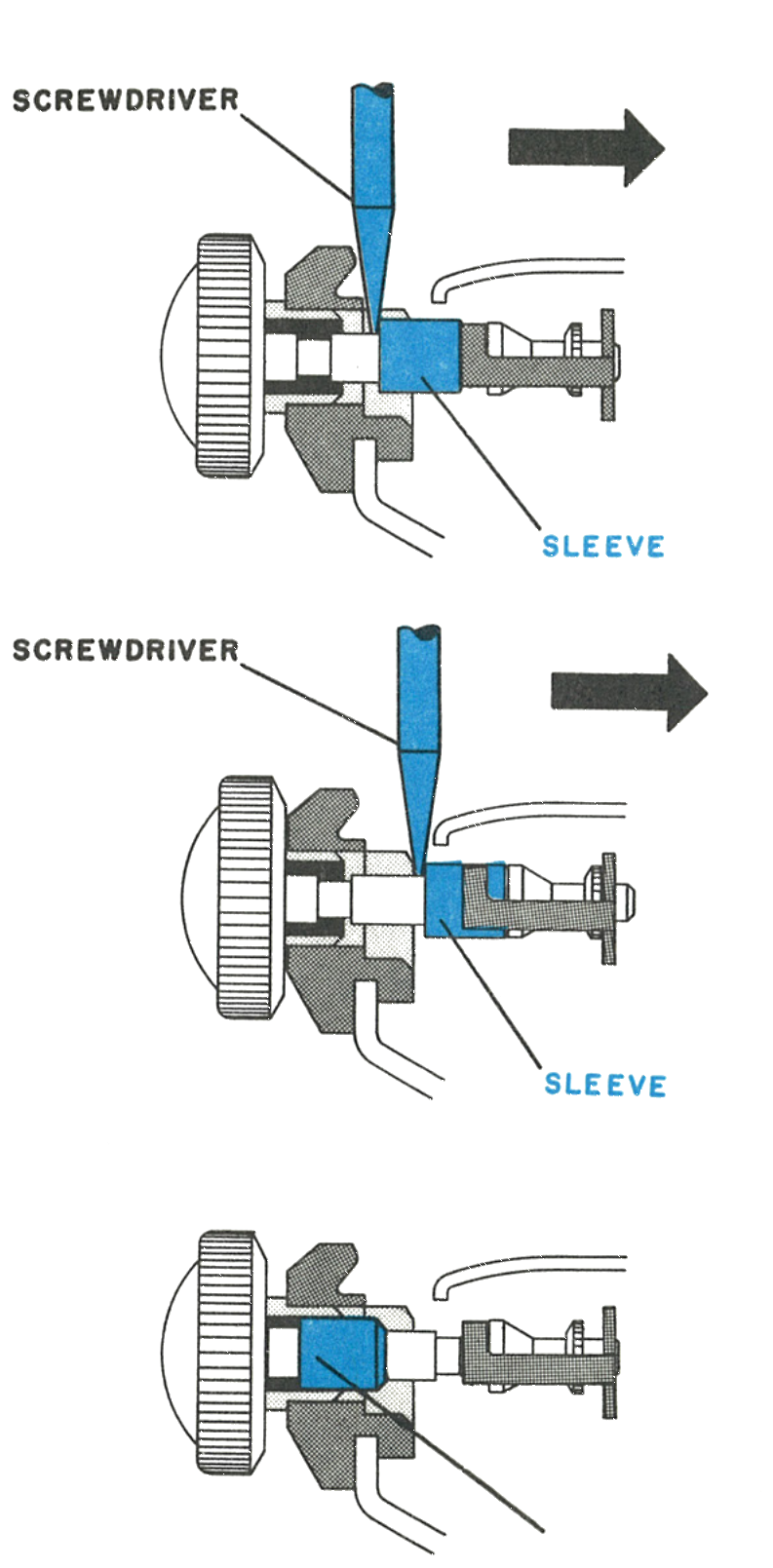
The stem release: Where the Models 40, 50 and 71 spread the stem bracket with tweezers, the Model 69 uses a sliding sleeve on the stem itself, pushed in with a screwdriver. That sleeve is free on the stem and can slide into the pendant, in which case it must be brought back with tweezers before the screwdriver will fit behind it.
The hands are set by pulling out and rotating the crown, which also stops the balance and interrupts the current. Hourly beat is 21,600.
Caution: Since the watch contains permanent magnets, no attempt should be made to demagnetize it.
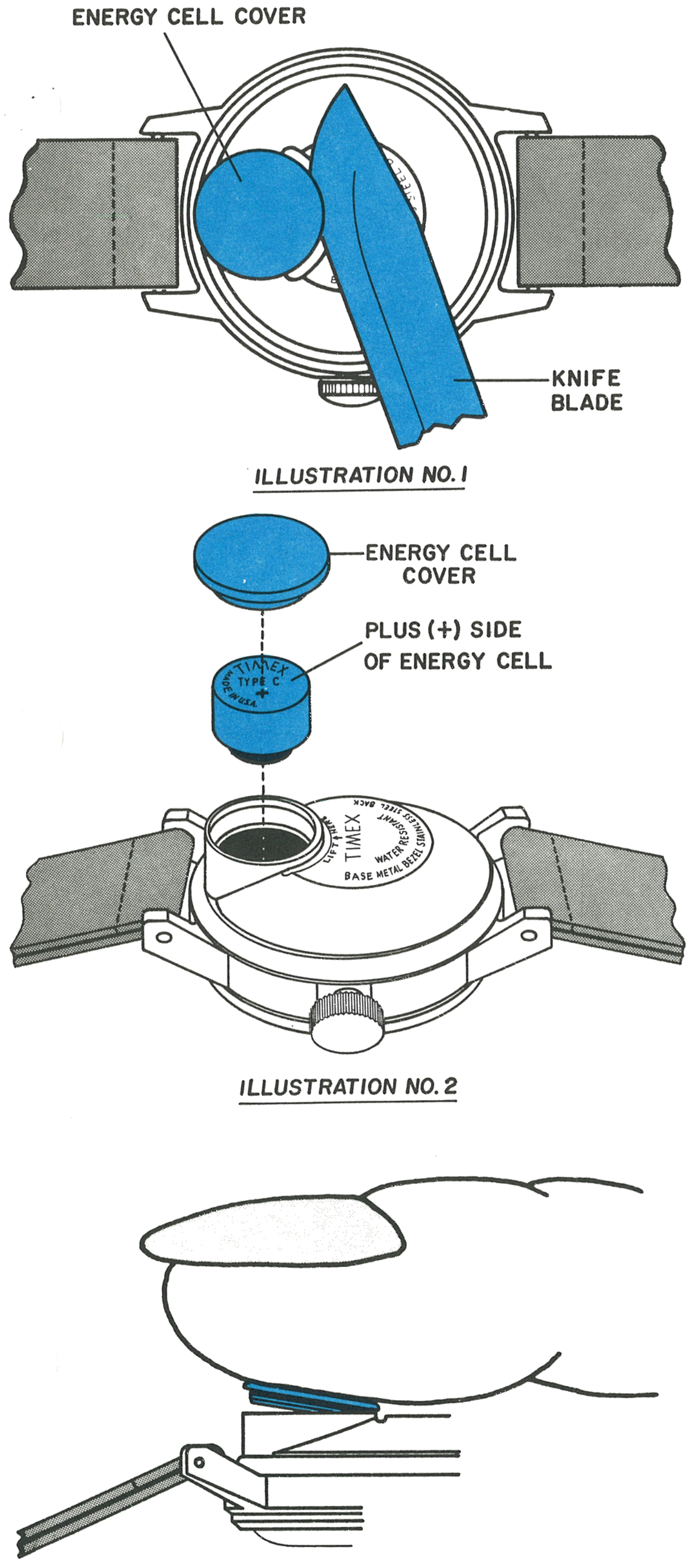
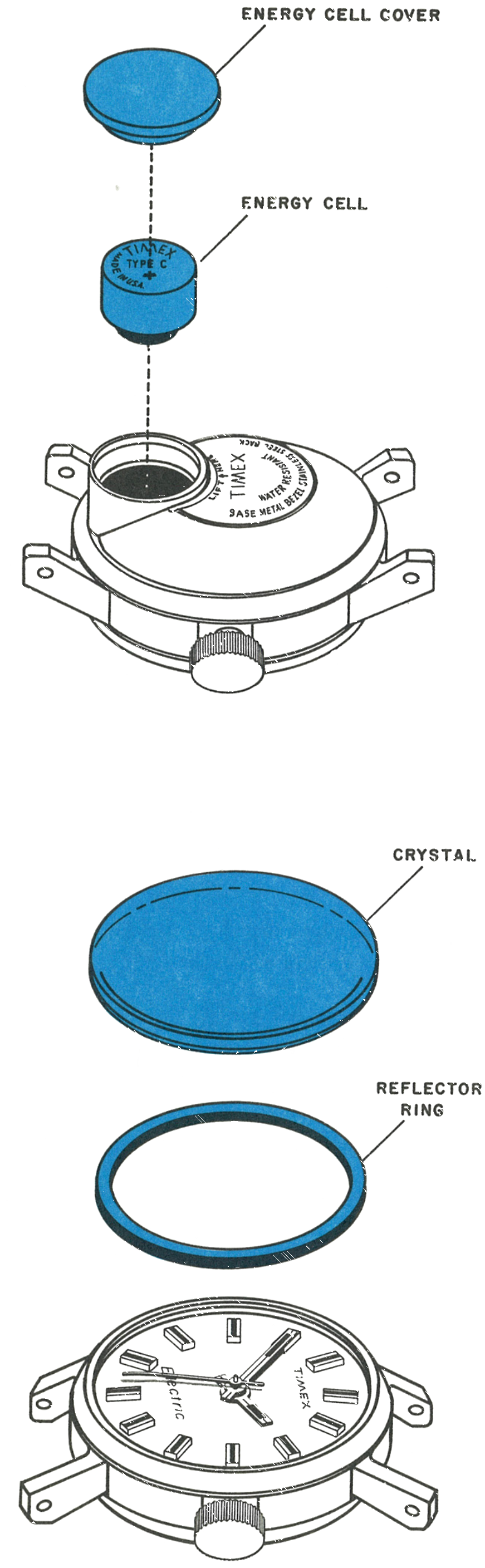
The energy cell cover is a flat circular piece located on the back of the watch. Insert a knife blade under the lip of the cover at the spot indicated by the words “Lift Here” stamped on the caseback and carefully pry off the cover.
Turn the watch right side up and the energy cell will fall out. Check the voltage. Any cell with a voltage of less than 1.30 volts, checked with a meter of at least 20,000 ohms per volt sensitivity, or one which has been in service in excess of one year, should be replaced.
Insert the new energy cell. Be certain that the side with the name Timex and the plus symbol is facing the energy cell cover.
Caution: Do not dispose of the cell in fire.
Fig. 69.3 · Illustrations 1 and 2
2 · Snapping the Cover Back
Replace the energy cell cover by leading in the edge toward the centre of the watch and then pressing on the outside edge until the cover snaps into place.
The instant the cover is snapped in place, electrical contact is made. If the watch does not start immediately, slight agitation of the watch may be necessary to restart the mechanism.
After the energy cell has been removed, the crystal and reflector ring may be dismantled. Use a Timex crystal lift or conventional crystal lift to remove the crystal.
2 · The Sliding Sleeve
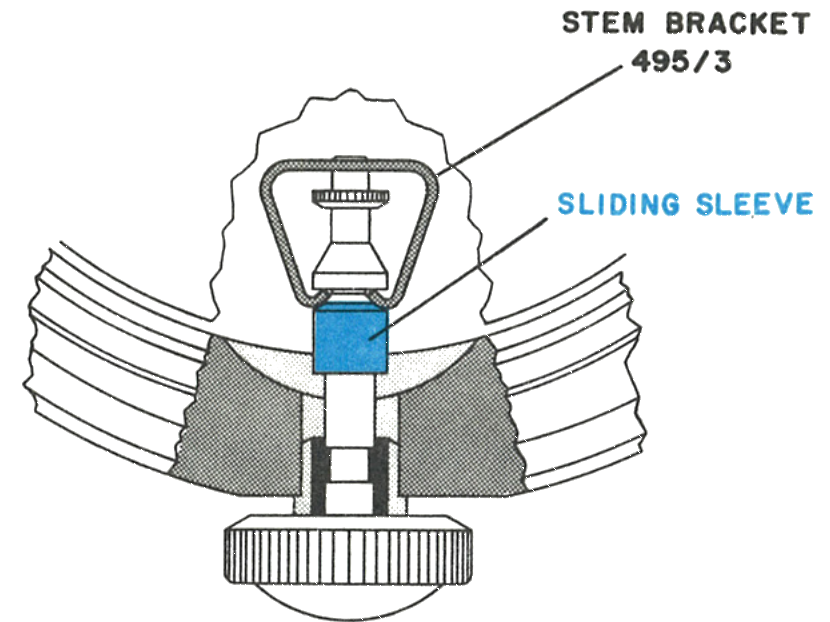
Since the only function of the stem on the Model 69 is to stop the movement and set the hands, the stem retention has been simplified by combining the stem and setting pinion and providing a novel stem bracket, 495/3. There are no screws or levers holding the stem. Instead, a sliding sleeve on the stem is used to release the stem bracket from the stem.
Fig. 69.4 · Crystal
The only function of the stem is to stop the movement and set the hands, so the stem and setting pinion are combined and held by a stem bracket, 495/3. Instead of screws or levers, a sliding sleeve on the stem releases the bracket.
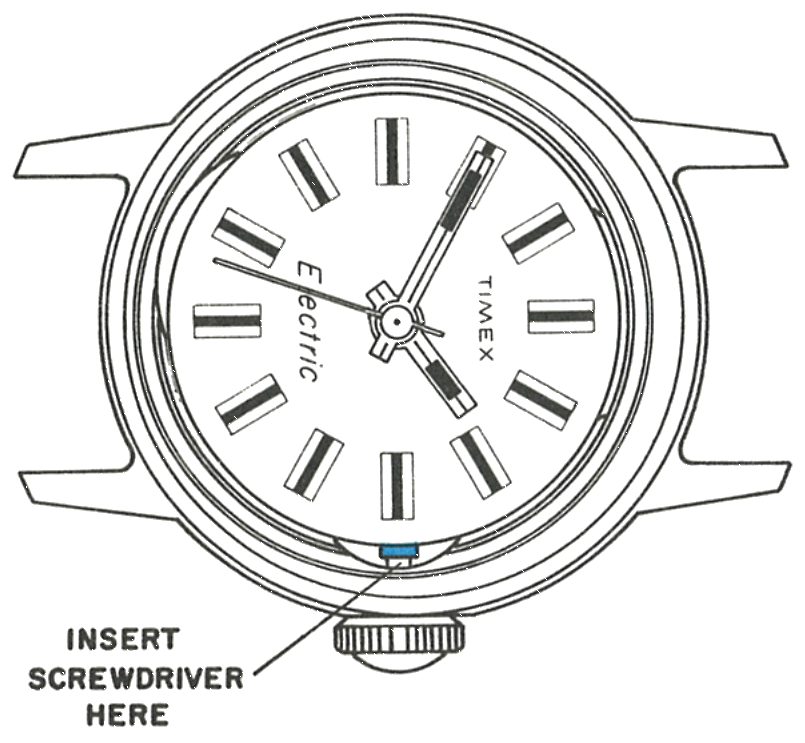
3 · Where the Screwdriver Goes
Insert the screwdriver at the point marked on the case.
Fig. 69.5 · Insert Here
4 · The Bracket and Sleeve
The stem bracket, 495/3, and the sliding sleeve on the stem.
Fig. 69.5 · Bracket & Sleeve
5 · Releasing the Stem
Pull the stem into set position. Then insert a screwdriver behind the sliding sleeve and push the sleeve in toward the centre of the watch while holding the movement in place.
When the sleeve is pushed in, the stem will return to the normal running position and the sleeve will have spread the ears of the stem bracket. The stem may now be removed by gently pulling out and turning the crown.
Since the sleeve is free on the stem, it may have slid into the pendant. In this case it will be necessary to slide the sleeve into position by means of tweezers so the screwdriver will fit behind it.
To replace the stem, hold the movement in place and firmly press the stem into place with a slight rotating motion so the stem pinion teeth will mesh with the minute wheel teeth.
Caution: Avoid damaging the crystal seat with the screwdriver blade. It is important to hold the movement in place while removing the stem.
Fig. 69.5 · Releasing the Stem
6 · Out of the Bezel
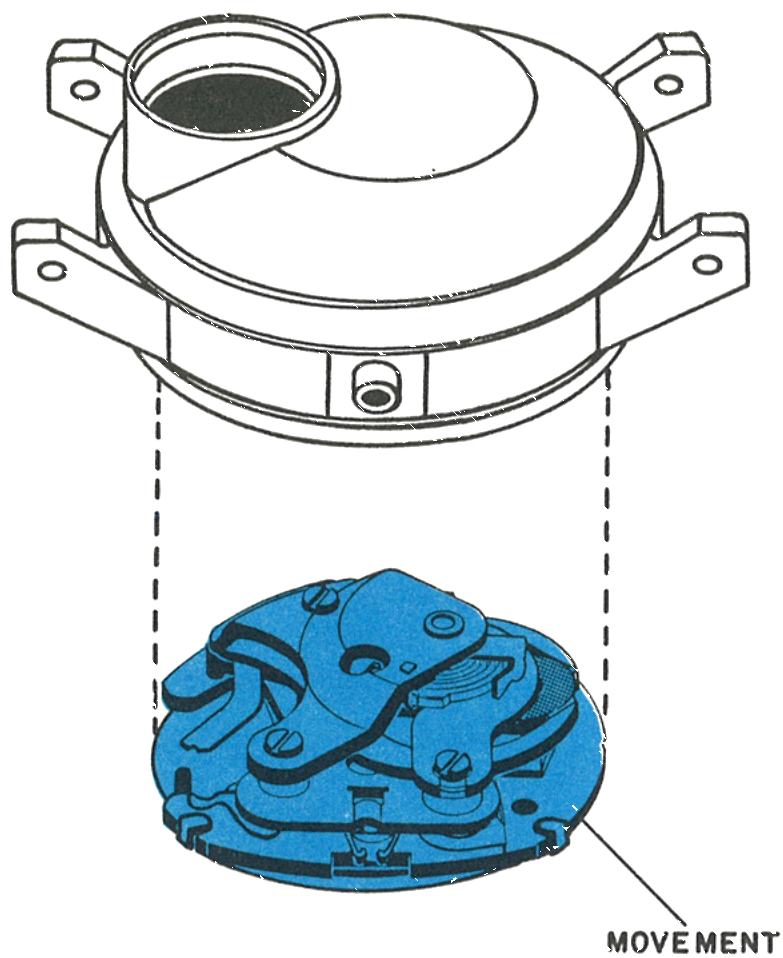
The movement may now be removed. Note the movement locating tabs on the inside of the bezel: when reinserting the movement, be cautious that it is in its proper position with respect to these tabs, otherwise the reflector ring and crystal will not seat properly.
Fig. 69.6 · Movement
7 · The Dial
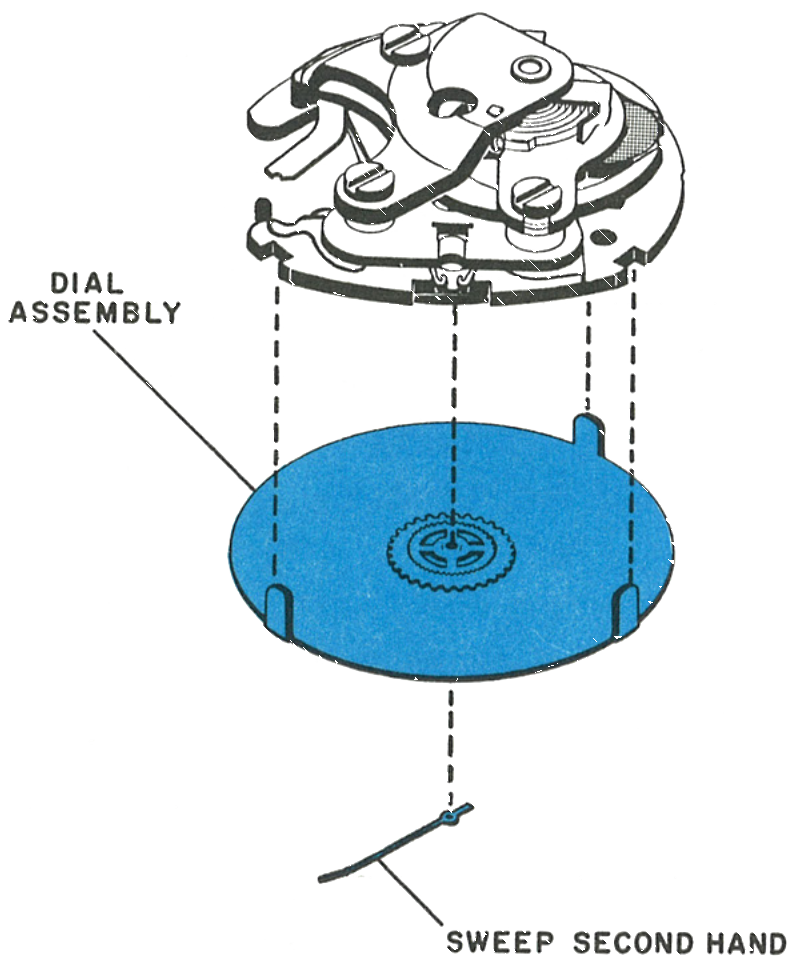
Remove the sweep second hand. Do not remove the minute or hour hand.
The dial is held on the movement by means of three tabs which are bent onto the plate assembly. Bend the tabs to release the dial assembly from the movement.
Fig. 69.6 · Dial
8 · The Cell Retaining Spring
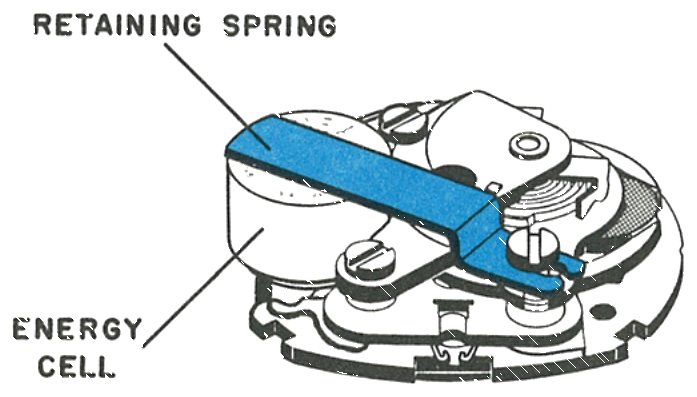
To examine the function of the movement, replace the stem, place the movement on a suitable movement ring and clamp the energy cell in place with an energy cell retaining spring, available on request from a Timex Material Sales Division.
Caution: The negative pole must touch the contact spring assembly (4080); the positive pole is grounded to the movement. Never make a metallic connection between the insulated and uninsulated parts. Remove the cell before further disassembly.
Fig. 69.6 · Retaining Spring
9 · The Shunt Bridge
Rotate the balance wheel to lock position before removing the shunt. This will avoid damage to the coil.
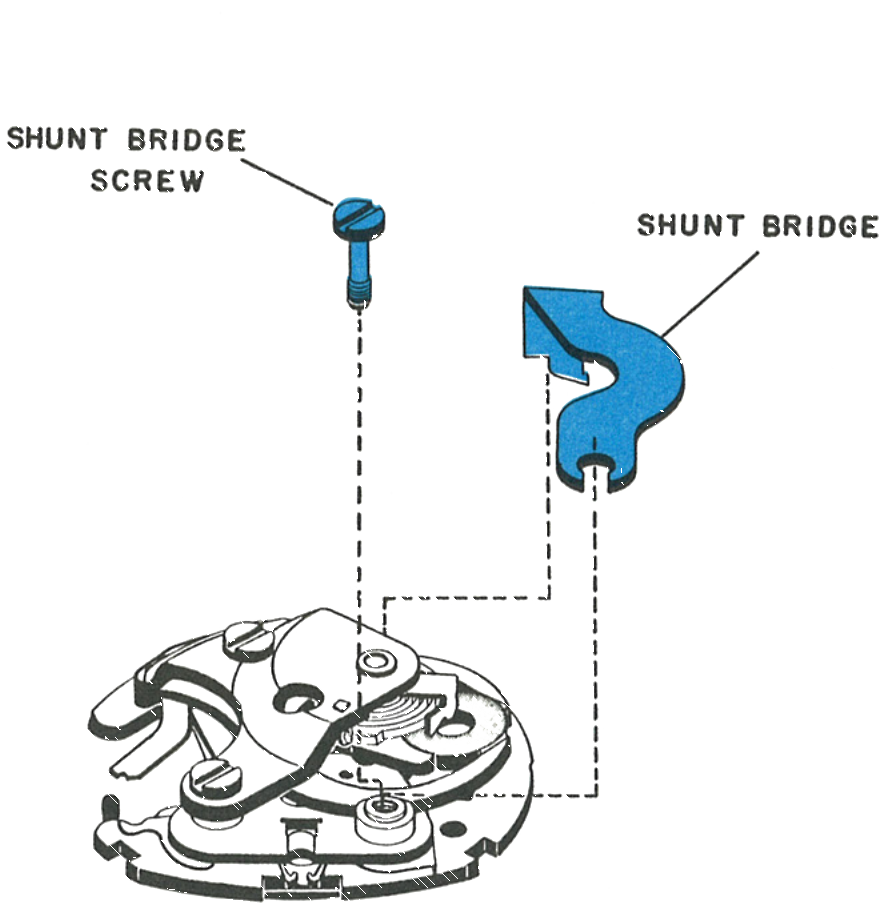
Remove the shunt bridge screw and carefully lift the screw end of the shunt bridge from its post. The opposite end is held in place by a tab overlapping the plate; gently push the shunt until the end is unhooked from the plate.
Caution: Carry this out carefully so as not to disturb the hairspring or balance. Afterwards put the shunt bridge screw back and tighten it.
Fig. 69.7 · Shunt Bridge
10 · The Balance Bridge
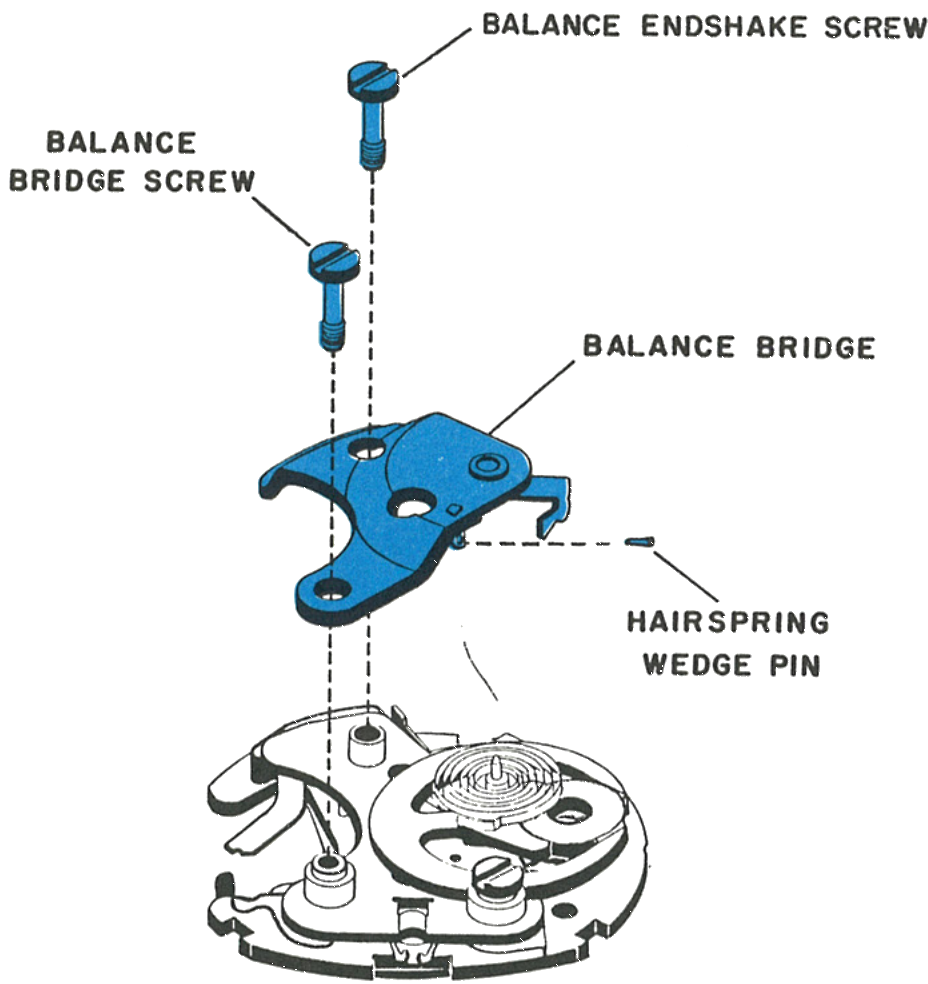
Unpin the hairspring and release it from the regulator. Next remove the balance endshake screw and then the balance bridge screw, then the balance bridge assembly.
Caution: Be certain the shunt bridge screw is in place first, otherwise the train wheel bridge will be disturbed.
Fig. 69.10 · Balance Bridge
11 · The Balance
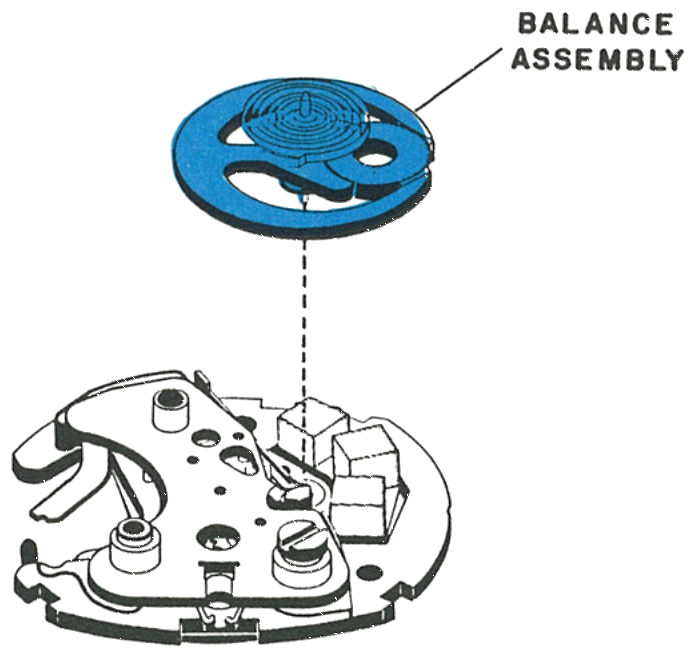
The balance may now be removed.
Fig. 69.10 · Balance
12 · The Train Wheel Bridge
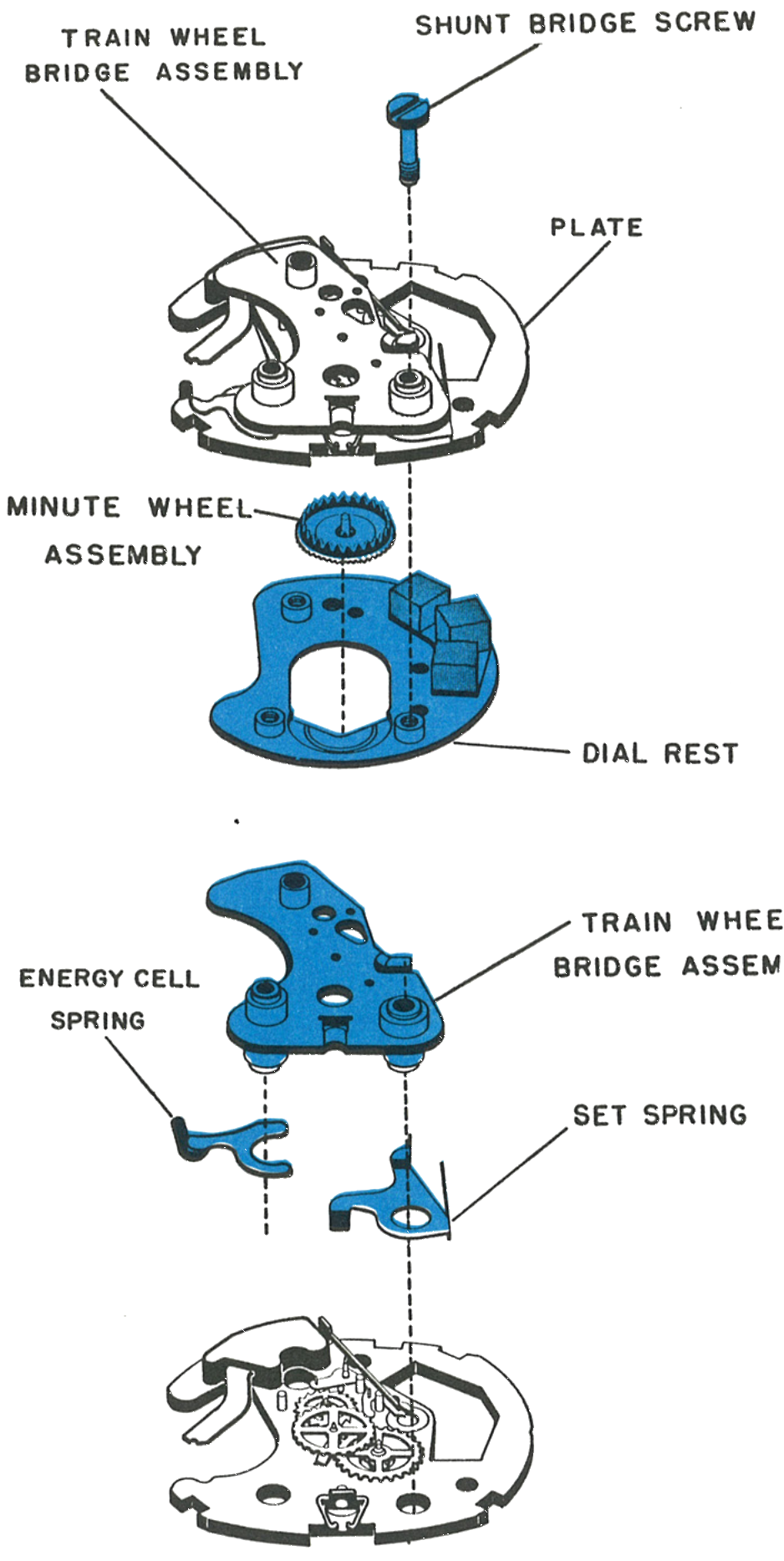
Remove the shunt bridge screw while holding the train wheel bridge and plate together. Keep these two parts together while removing the dial rest and minute wheel assembly. This method will keep the gear train parts from being attracted to the magnet when the train wheel bridge is removed.
Next, place the movement in a suitable holder and carefully remove the train wheel bridge.
Fig. 69.11 · Train Bridge
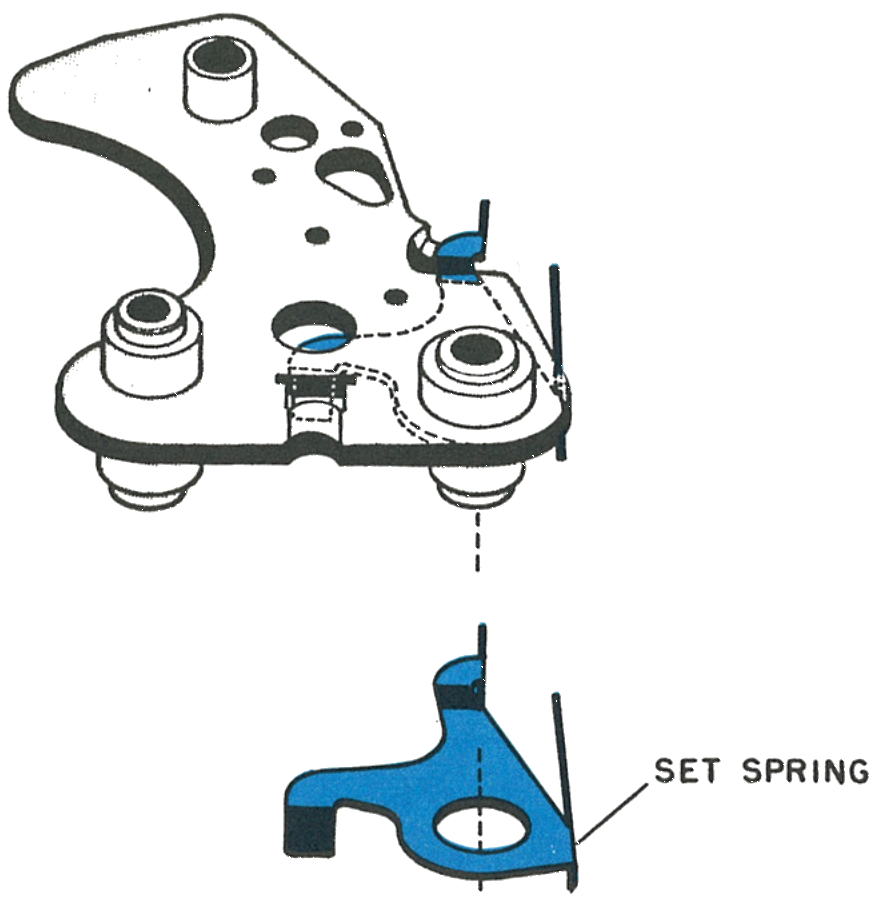
13 · The Set Spring
Note the position of the set spring. The hole in the spring fits over one of the train wheel bridge pillars, and the end of the spring toward the balance fits over a tab on the train wheel bridge.
Fig. 69.11 · Set Spring
Service Bulletin No. 102
Timex Service Bulletin No. 102 · October 1971
A Timex service bulletin added two procedures the factory manual does not show: lifting the movement out of its case back, and removing the stem on the non water resistant models, which have no sliding sleeve.
Movement Removal
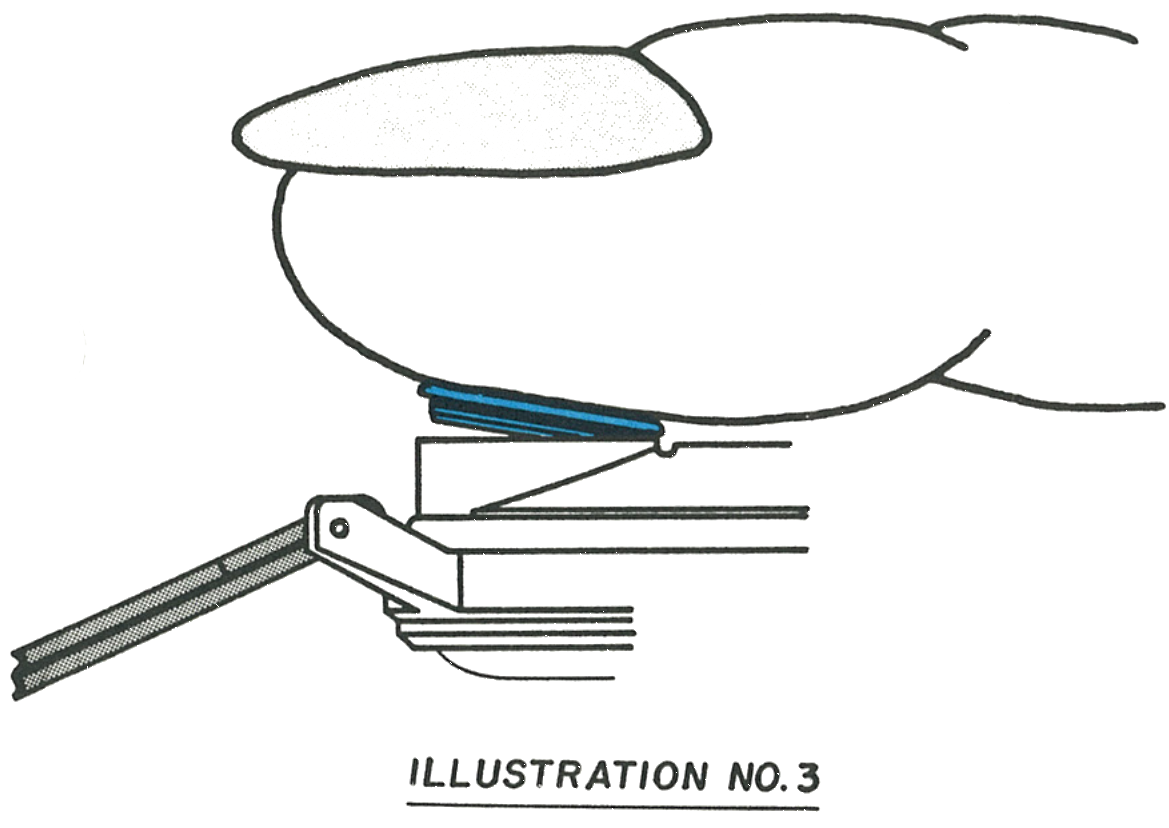
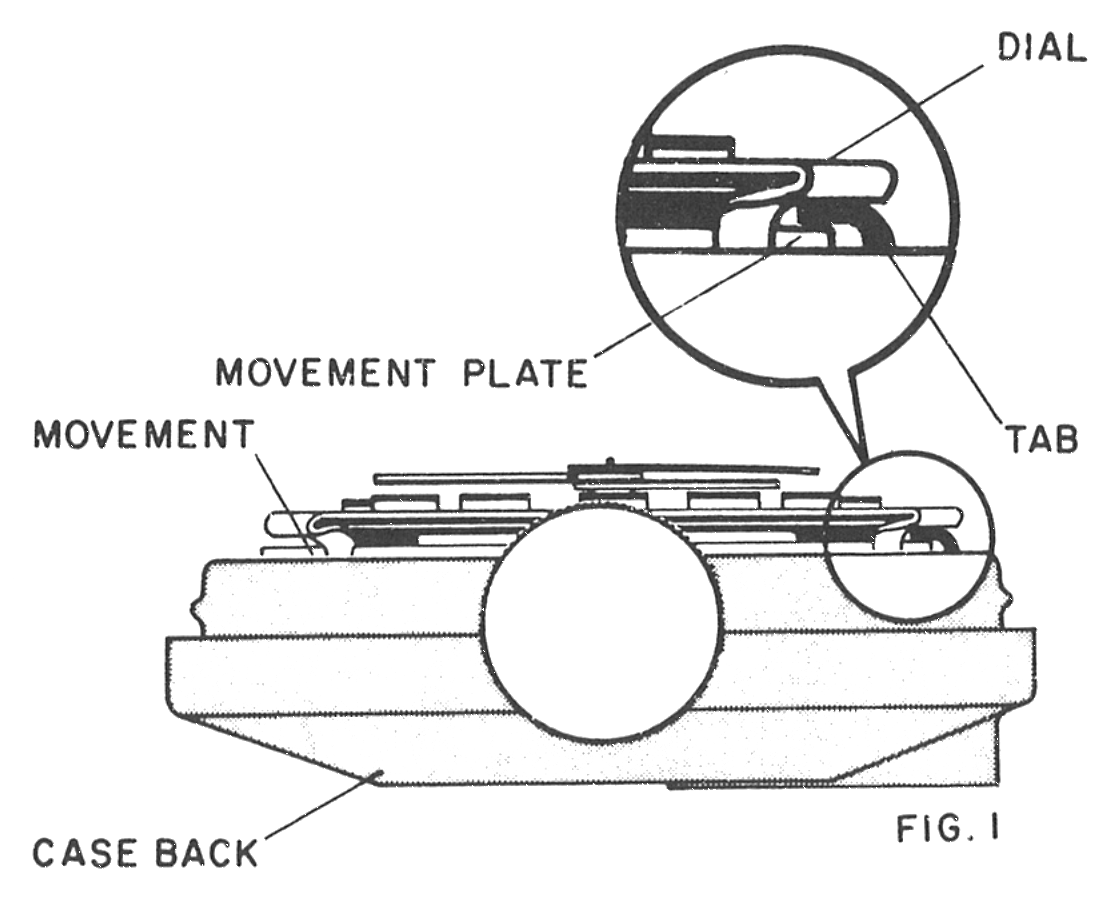
The movement is held captive at the 12:00 position by a tab extending from the case back. The tab sets in a space provided between the movement plate and the dial, firmly holding the movement in place. (Fig. 1)
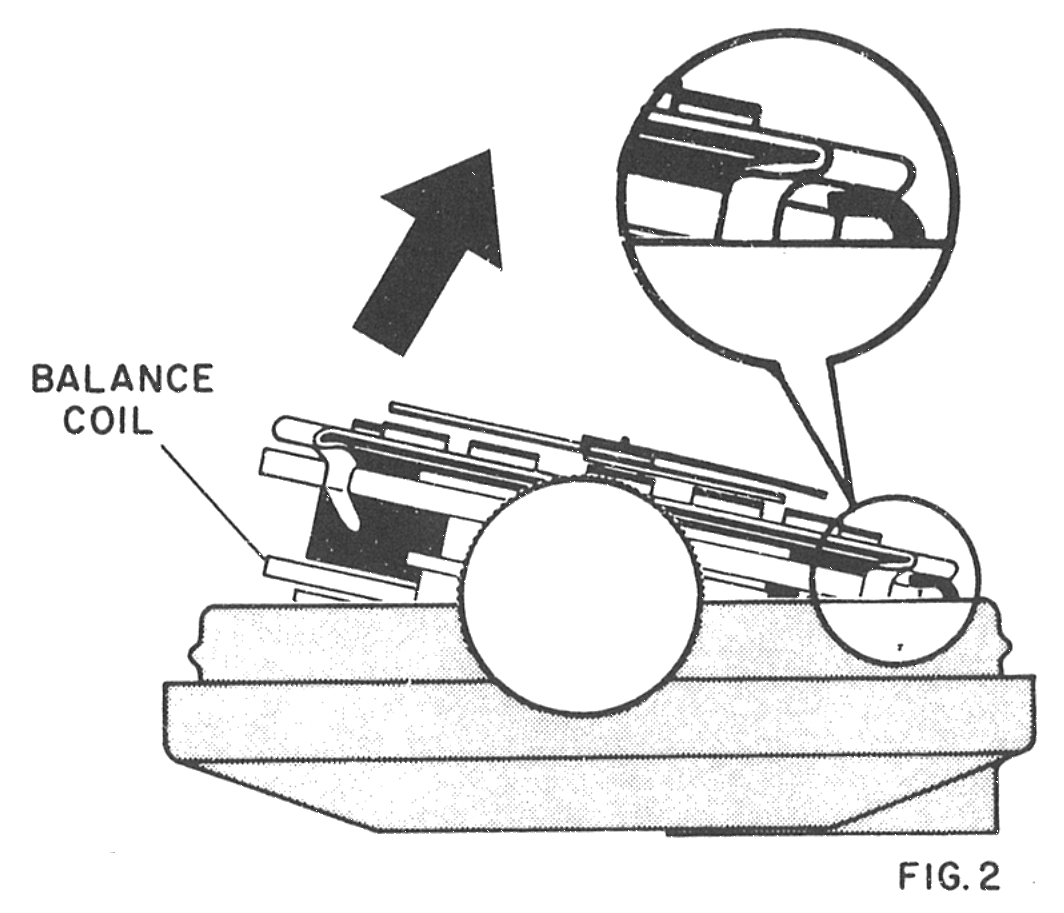
Lift movement at 6:00 position, exercising caution to avoid striking or damaging the balance coil which is located in this area. (Fig. 2)
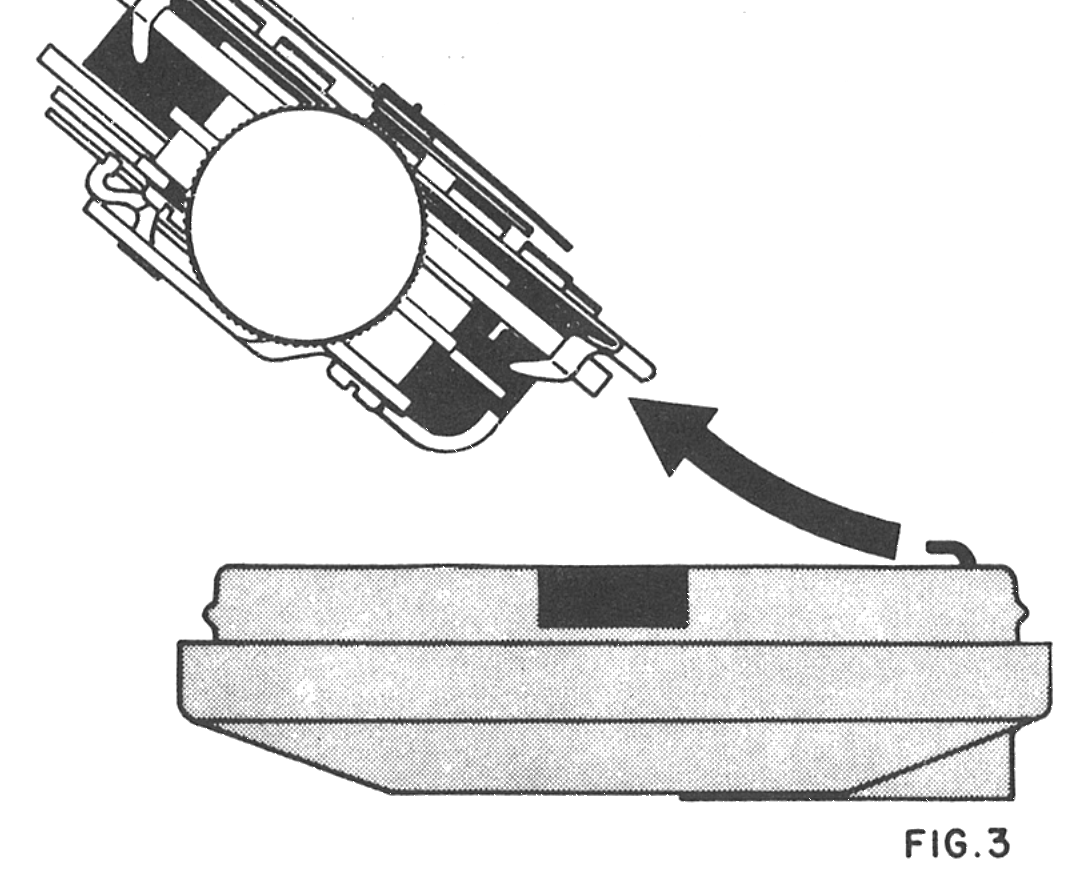
When 6:00 position of movement is completely free of caseback, slide movement out. (Fig. 3)
Set Stem Removal · Non Water Resistant Models
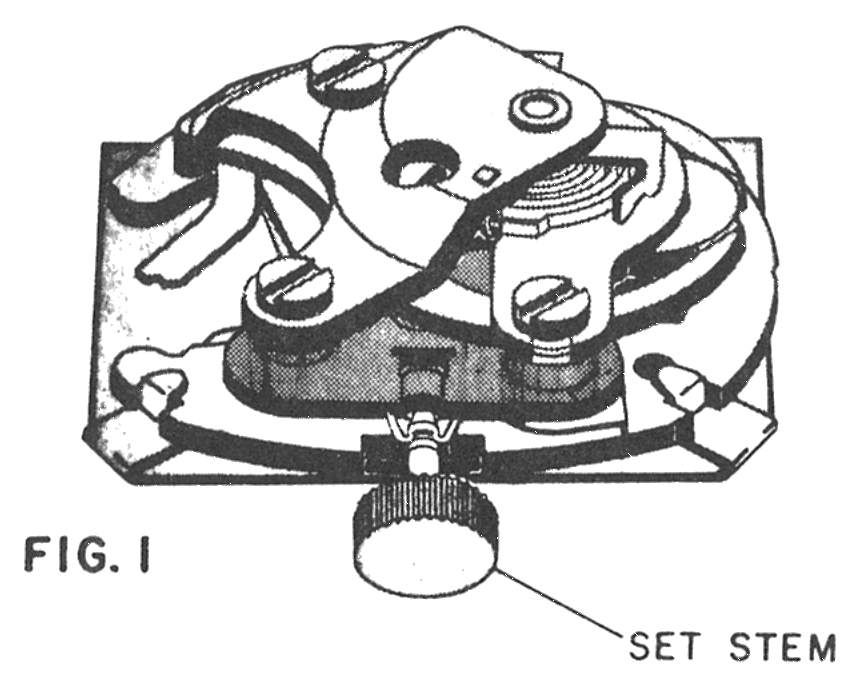
There are no screws or levers holding the set stem. To remove the set stem, pull the set stem into set position maintaining a slight outward pull. (Fig. 1)
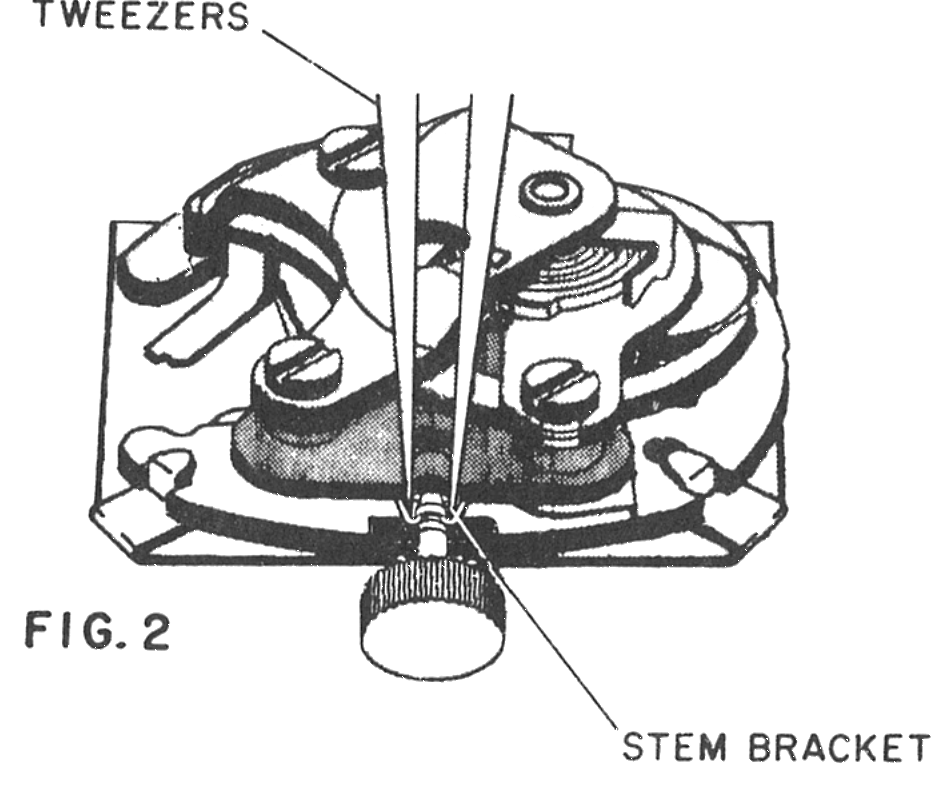
Next, place the points of a set of tweezers into the space between the set stem and the stem bracket. (Fig. 2)
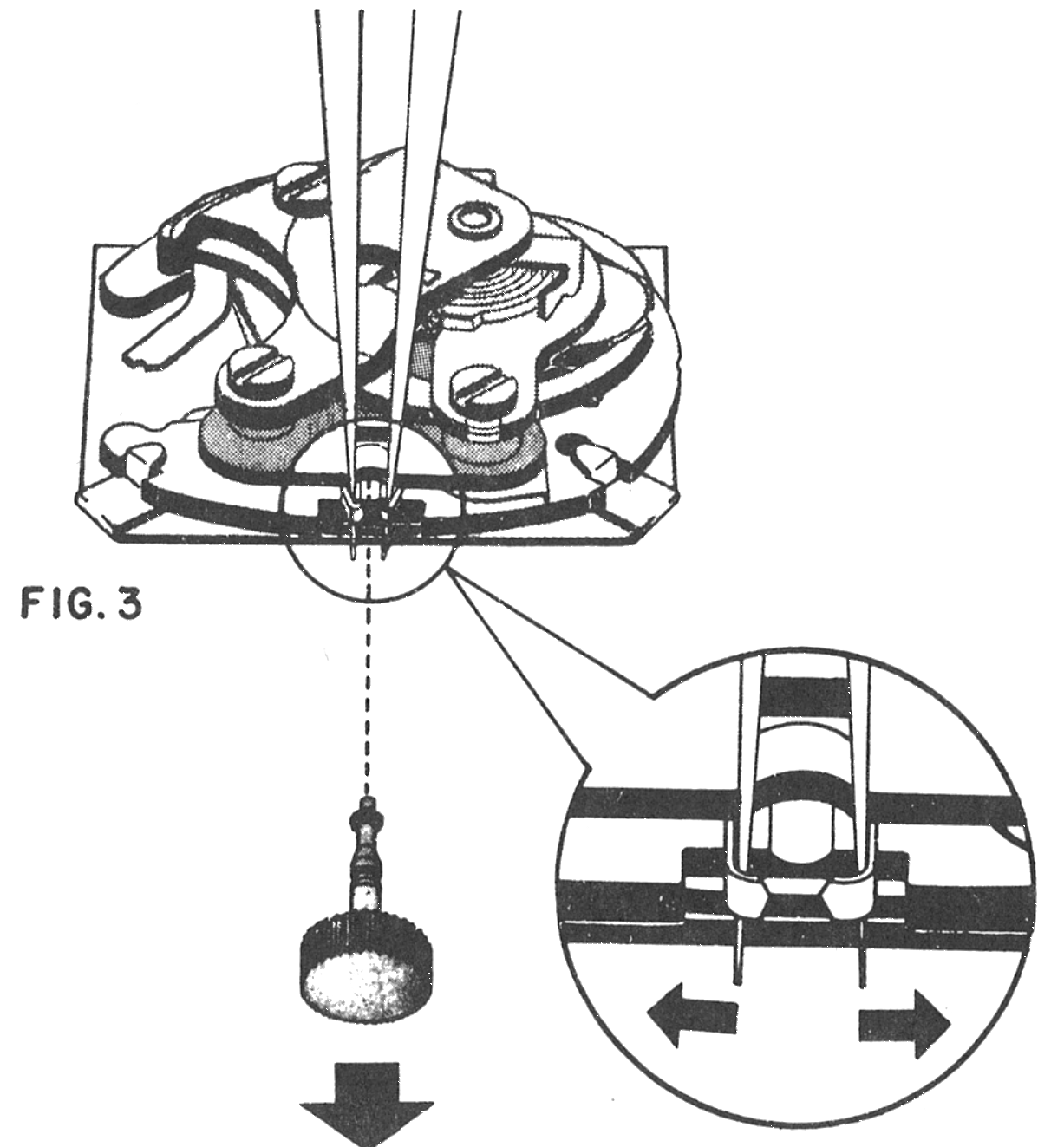
Now, gently spread the ears of the stem bracket in the direction of the arrows. When both sides of the stem bracket have been spread, the set stem will then pull out completely. (Fig. 3)
The Contact System
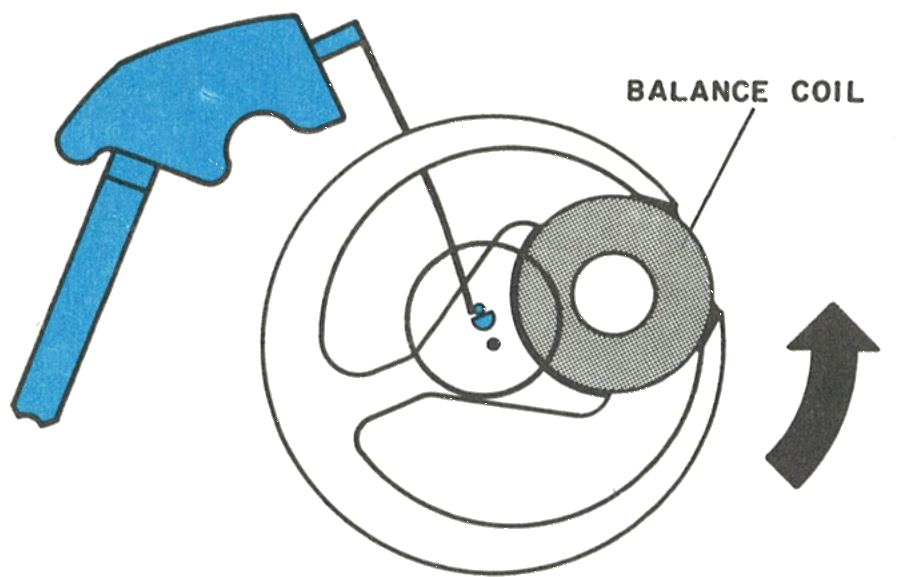
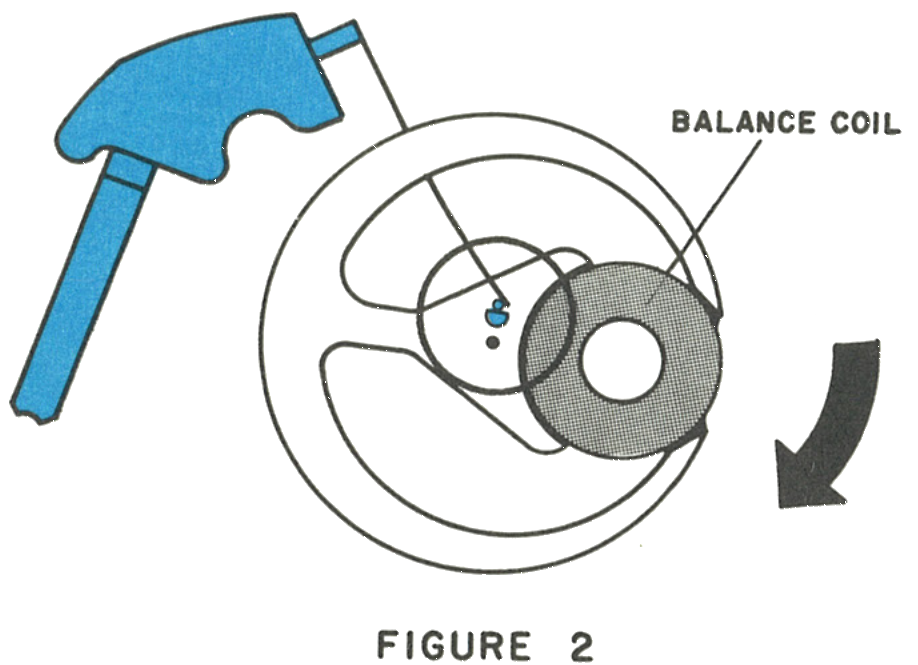
Rotate the balance slowly from its rest position with a clean brush. The instant the contact spring touches the contact pin fixed on the balance, current flows through the balance drive coil. The current induces a magnetic field which opposes the field of the magnet, and this opposition imparts an impulse to the balance.
1 · The Contact Closing
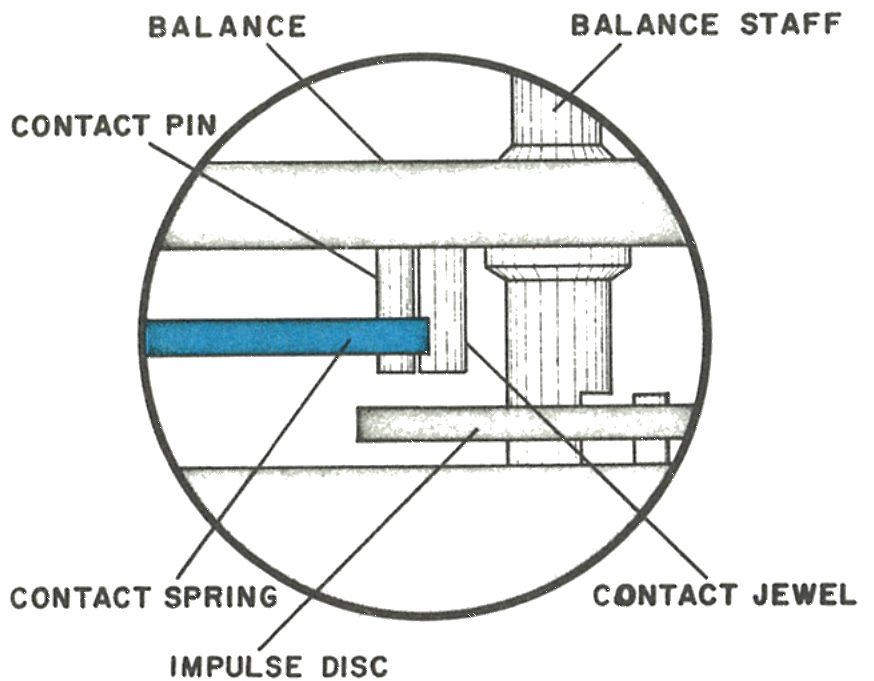
The contact pin, contact spring, contact jewel and balance coil.
Fig. 69.8 · Figure 1
2 · The Return Stroke
After the balance returns to its neutral position the same process is repeated in the opposite direction. Repeat this test several times until the drive action is fully understood. The function of the remainder of the movement is fully mechanical.
The purpose of the contact jewel is to limit the physical contact between the contact pin and contact spring, so that the flow of electrical energy occurs at a precise position during the rotation of the balance.
Fig. 69.8 · Figure 2
3 · Pointing at the Balance Staff
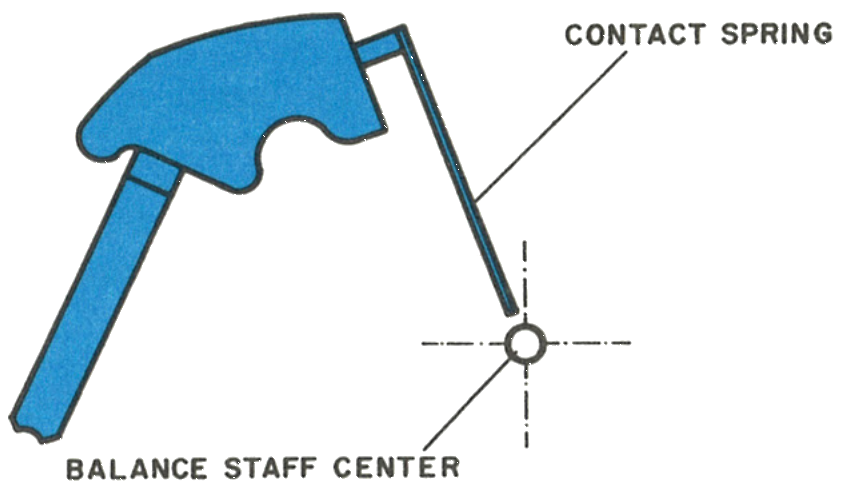
The contact spring must be pointing exactly to the centre of the balance staff.
4 · Centred Between Disc and Balance
Caution: The contact spring requires very careful treatment. Protect it from scratches and deforming, avoid excessive bending, and do not touch the contact area at the end of the spring. Handle it with the same care as a hairspring. Its length is fixed at the factory; no attempt should be made to adjust it.
Fig. 69.9 · Contact Spring
5 · D · Centred Horizontally
Fig. 69.9 · Section
Never oil the contact: The contact pin, contact jewel and contact spring must NOT be oiled. Oil on these parts would interrupt the flow of current to the drive coil.
Index Train & Stopping
1 · Figure 1
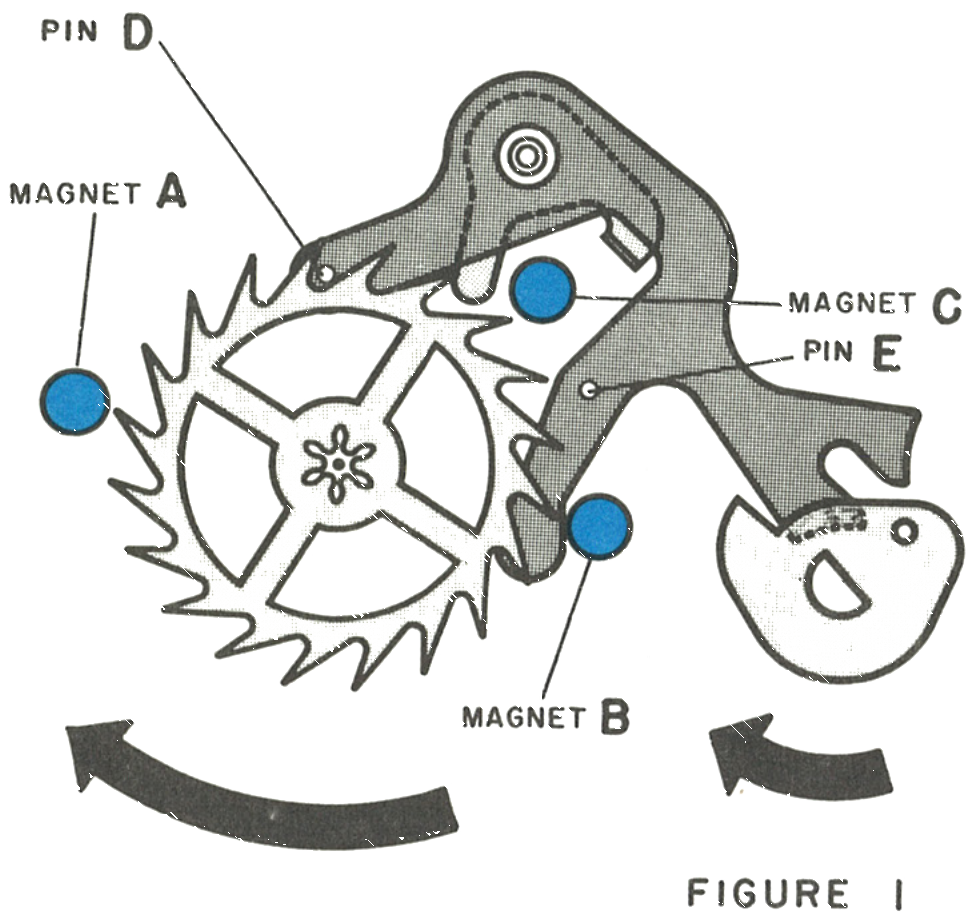
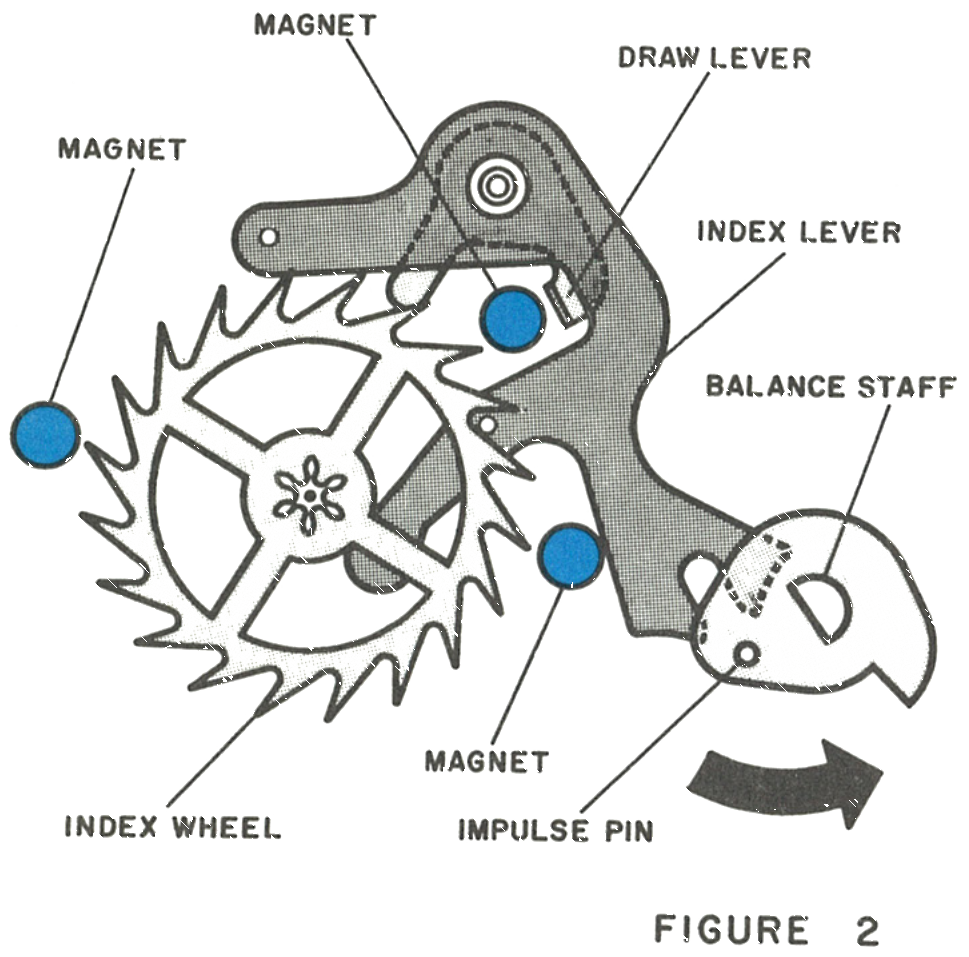
The impulse pin on the balance, when moving clockwise, engages with the fork on the lever and moves the lever counterclockwise. Pin D on the lever engages with the index wheel and moves it forward approximately three quarters of one tooth. The magnets A, B and C attract the tips of the index wheel teeth and move the wheel forward the remaining quarter tooth.
Magnet C also attracts the draw lever on the index lever and holds the index lever in place. Magnet B also acts as a banking pin for the lever.
Fig. 69.12 · Figure 1
2 · Figure 2
If, for any reason, the index wheel is not positioned correctly by the magnets, pin E on the lever turns the index wheel to its correct position, so that the next engagement of pin D, actuated by a clockwise rotation of the balance, will advance the index wheel correctly.
Fig. 69.12 · Figure 2
3 · The Friction Pinion
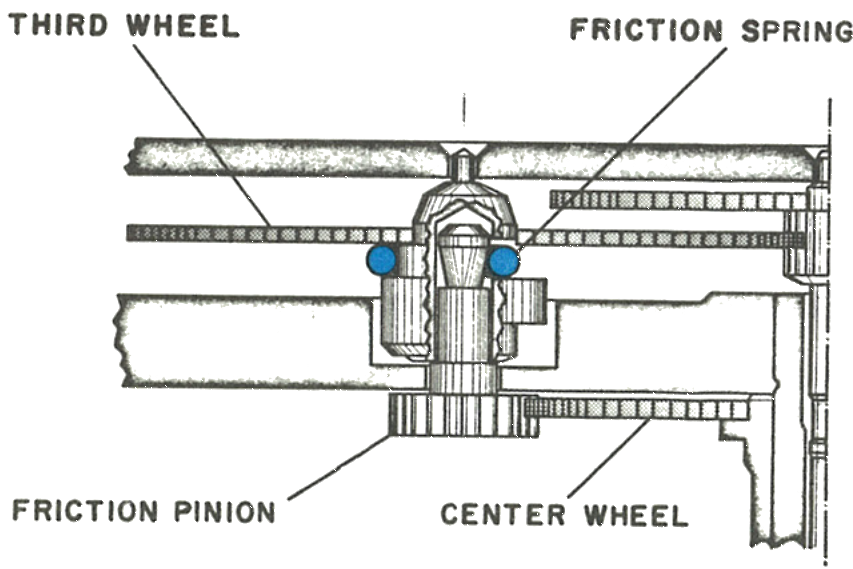
Setting friction for the dial train is provided by a spring connecting the friction pinion and the third wheel. The third wheel and friction pinion may be separated by lifting the friction pinion with tweezers, which unsnaps it from the friction spring.
4 · The Stop Mechanism
The balance stop mechanism is purely mechanical.
Fig. 69.12 · Friction Pinion
The balance stop mechanism is purely mechanical.
5 · Running Position
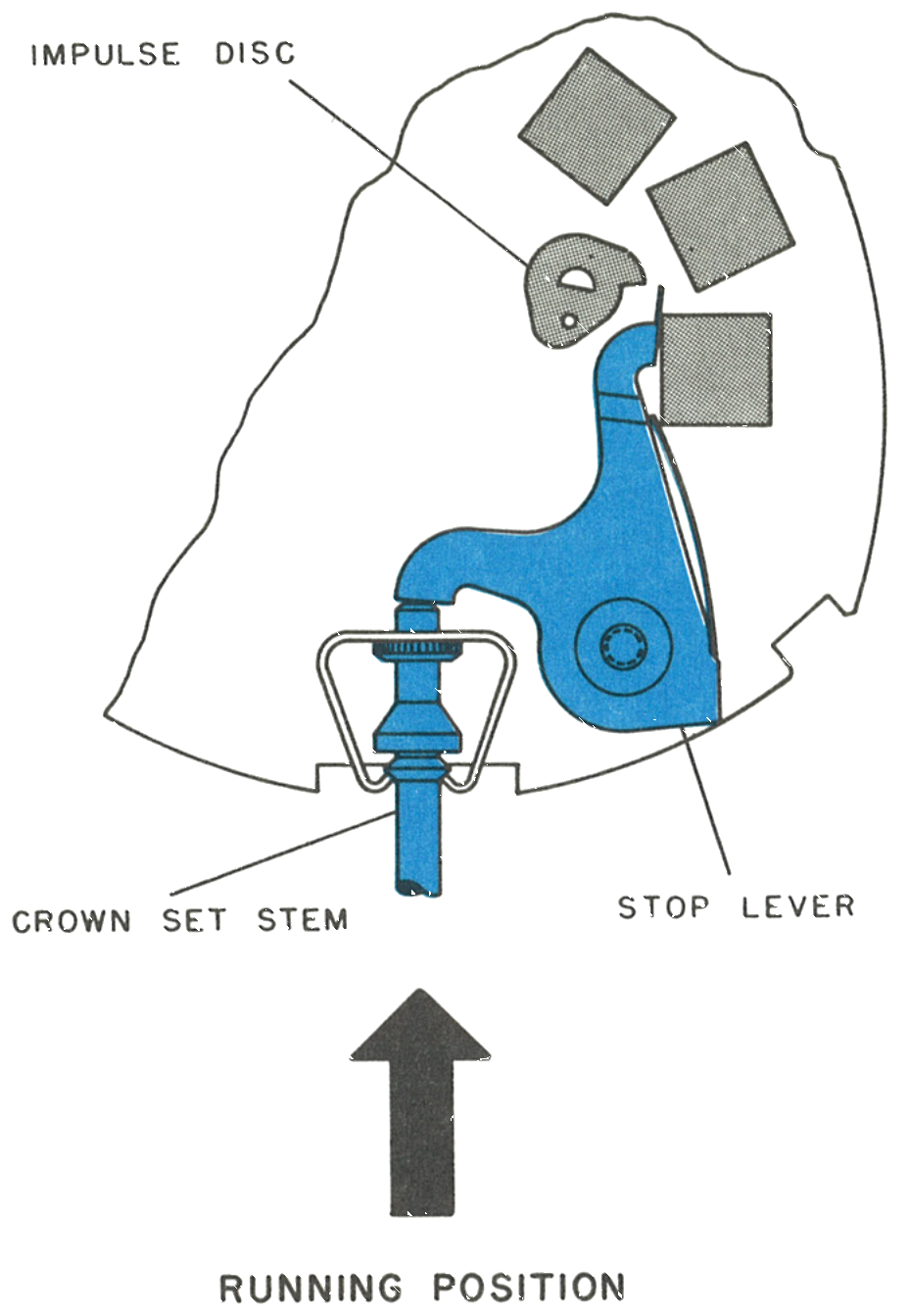
The tip of the stem butts against the stop lever and keeps the tip of the stop lever away from the balance impulse disc.
Fig. 69.13 · Running
6 · Stop Position
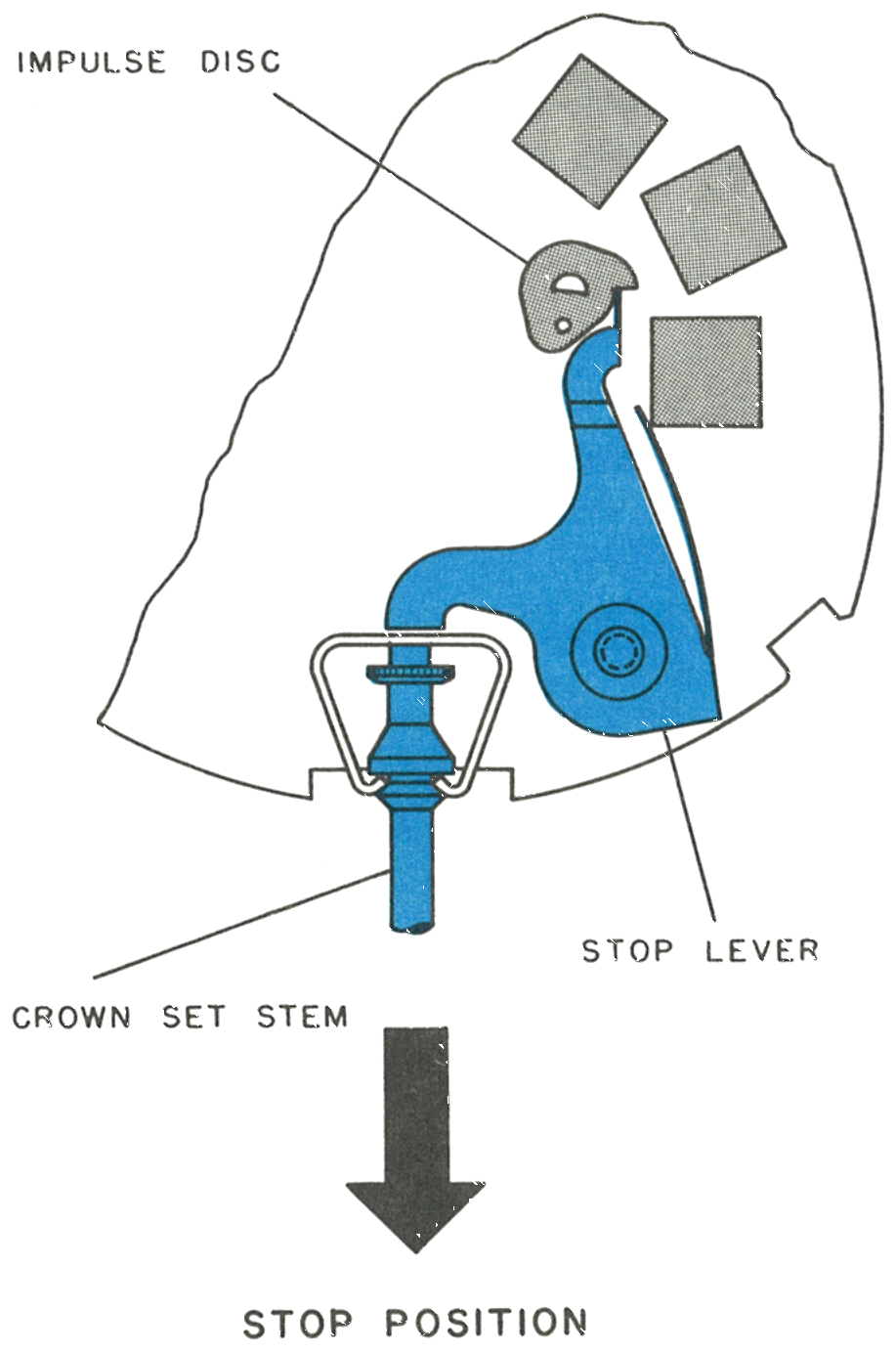
With the stem pulled out into the set position, the tip of the stop lever butts against the impulse disc on the balance, stopping the balance.
Fig. 69.13 · Stop
7 · The Seconds Wheel Friction Washer
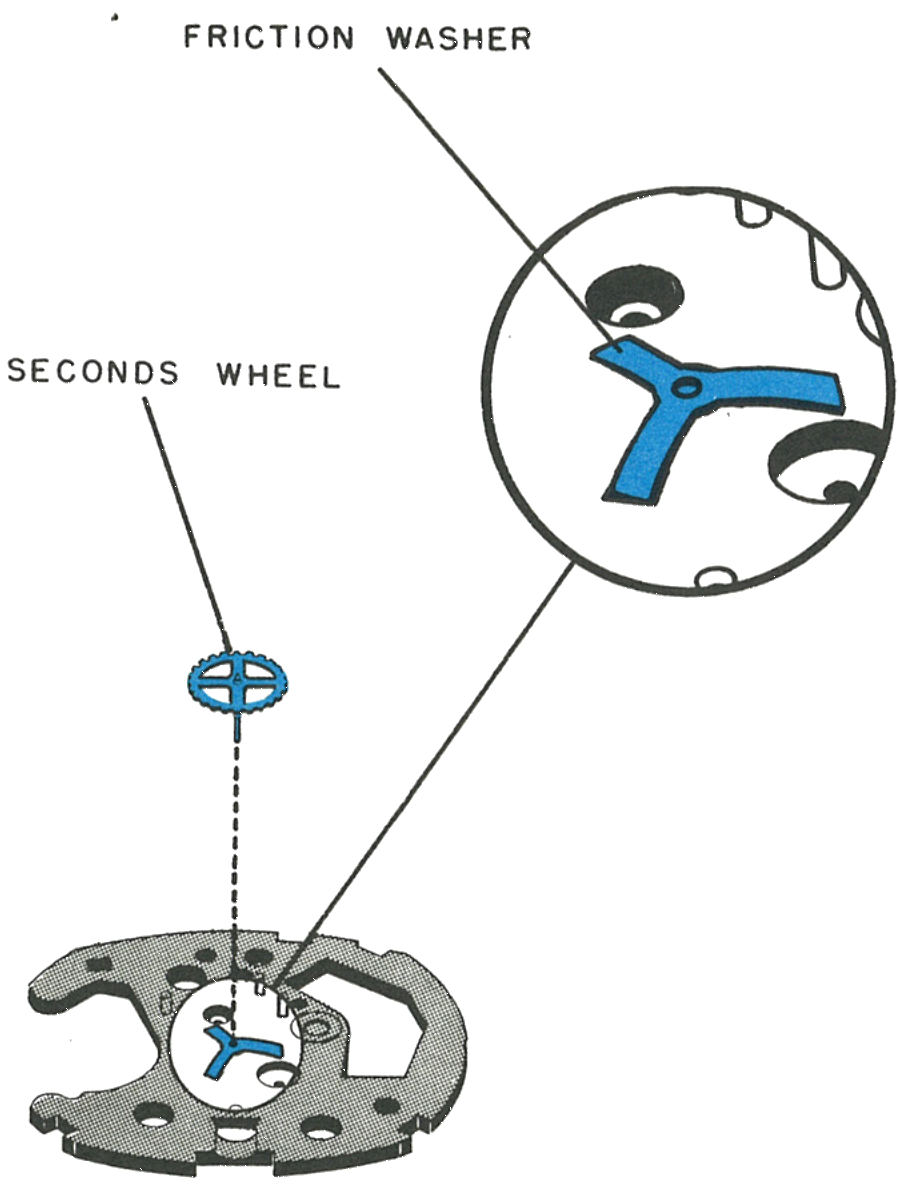
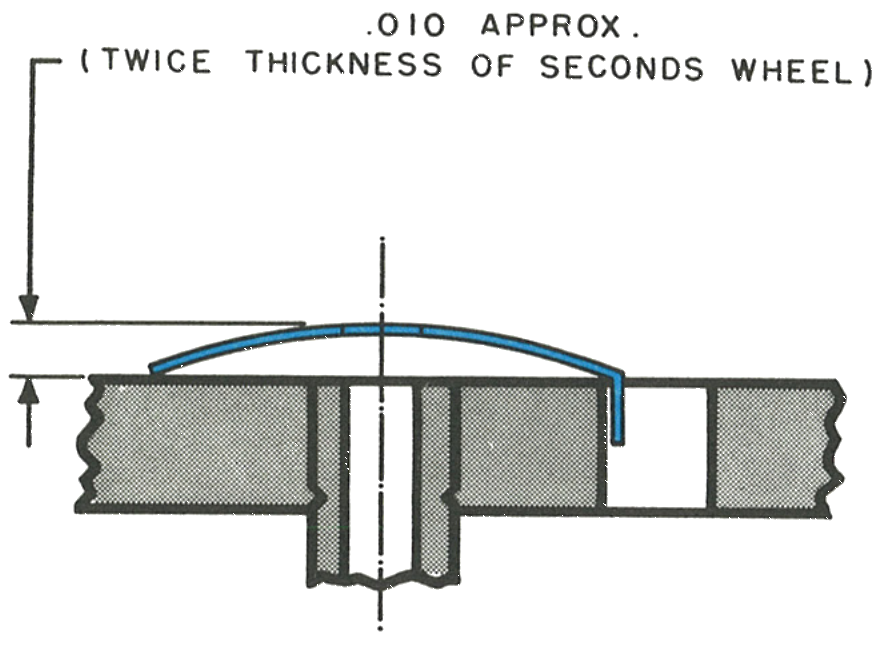
A friction washer is located between the plate and the seconds wheel, domed slightly. Check that it has not become damaged during disassembly. Too much friction will cause too great a drag on the movement; too little will cause an erratic sweep second hand action.
A tab on one leg of the washer fits into a slot on the plate to prevent it from turning.
Fig. 69.14 · Friction Washer
8 · The Dome
The dome is .010 approximately, twice the thickness of the seconds wheel.
Fig. 69.14 · Washer Dome
Cleaning & Lubrication
Lubricant change, June 1974: Timex Service Bulletin No. 111 replaced the factory oil for this model. Moebius Synt-A-Lube oil is used instead of Elgin M56B oil. (It supersedes Bulletin No. 108.)
Timex has found, after careful investigation, that the best way to clean the movement is to disassemble it only to the point of removing the balance bridge and the balance.
The balance should be cleaned separately in a small jar to avoid damage to the coil. The coil is composed of ultra-fine copper wire and should not be handled with tweezers or other sharp instruments. Only standard watch cleaning solutions should be used throughout. Particles adhering to the magnets can be removed with Scotch tape.
The movement should be re-lubricated in the normal manner using only high grade watch oils; Elgin M56b is used in factory assembly. The balance bearings should be filled half full before inserting the balance.
Other lubricating points are the impulse pin or fork slot, the index lever pivots, the index wheel teeth, all wheel pivots, the junction of the center wheel pinion and friction washer, and the junction between the minute wheel and dial rest. Apply grease, PML type, to the stem where it is held by the stem bracket.
Caution: Do not lubricate the contact spring or contact pin on the balance. Do not use oil or greases containing silicone.
Reassembly
1 · Third wheel2 · Friction washer3 · Index lever4 · Index wheel5 · Seconds wheel6 · Stem bracket7 · Stop lever8 · Contact spring9 · Train wheel bridge
The third wheel: Place the friction pinion, pinion side down, on a flat anvil, then place the movement plate over it, then snap the third wheel with its friction spring over the post. This avoids damage to the hole in the movement plate.
10 · Balance Endshake
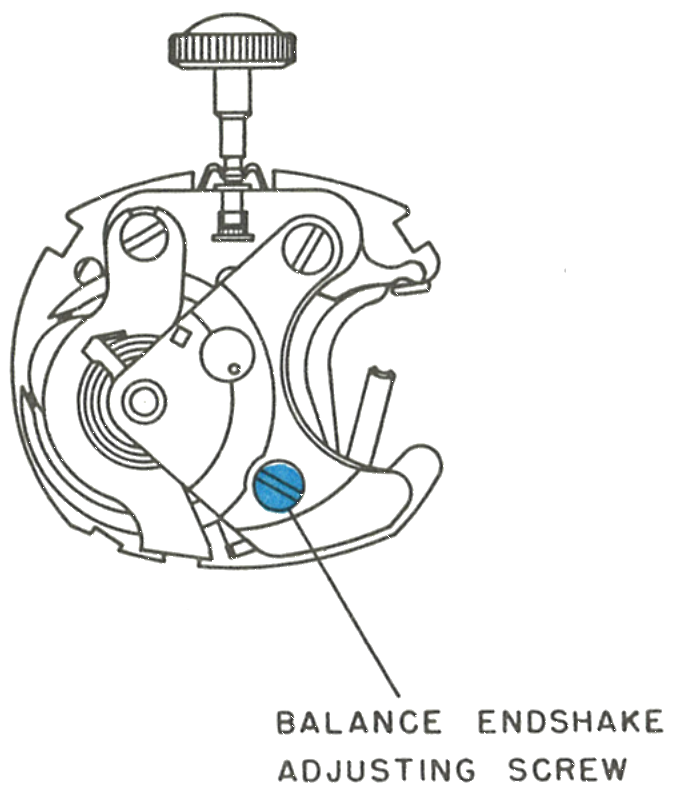
The balance bridge screw on the 9 o’clock side serves to adjust the balance endshake. Tightening this screw will reduce the endshake. Use caution while adjusting to avoid damage to the points of the balance staff.
Inspect the hairspring to be certain it is properly adjusted. It should be in light permanent contact with the inside edge of the regulator slot, held in this position by a tab extending from the regulator.
Fig. 69.16 · Endshake
11 · The Sweep Second Hand
When replacing the dial assembly, pre-position the hands to 12:00 before inserting the tabs on the dial into the plate, then bend the tabs to secure the dial.
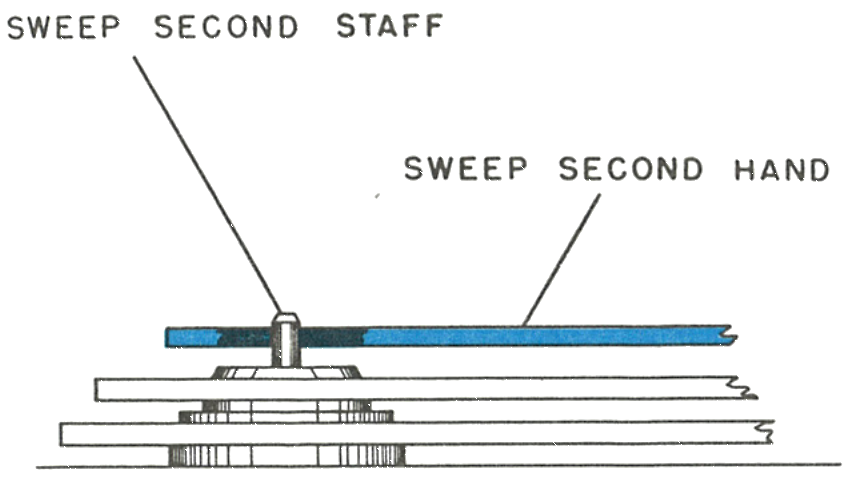
Replace the sweep second hand by driving it just below the end of the sweep second staff. Be certain the sweep hand is set below the chamfer on the top of the staff.
Fig. 69.16 · Sweep Hand
This guide is based on the original Timex factory service manual for the Model 69 movement.