An electronic calendar movement with a second hour hand, showing the time in two zones at once. The clutch that sets the difference between the two hour hands is inside the dial assembly, not the movement.
The Timex Model 65 is an electronic calendar movement with the added feature of a second hour hand to show the time in two zones simultaneously. The basic movement is similar to the Timex Model 50, with some parts and assemblies which are different.
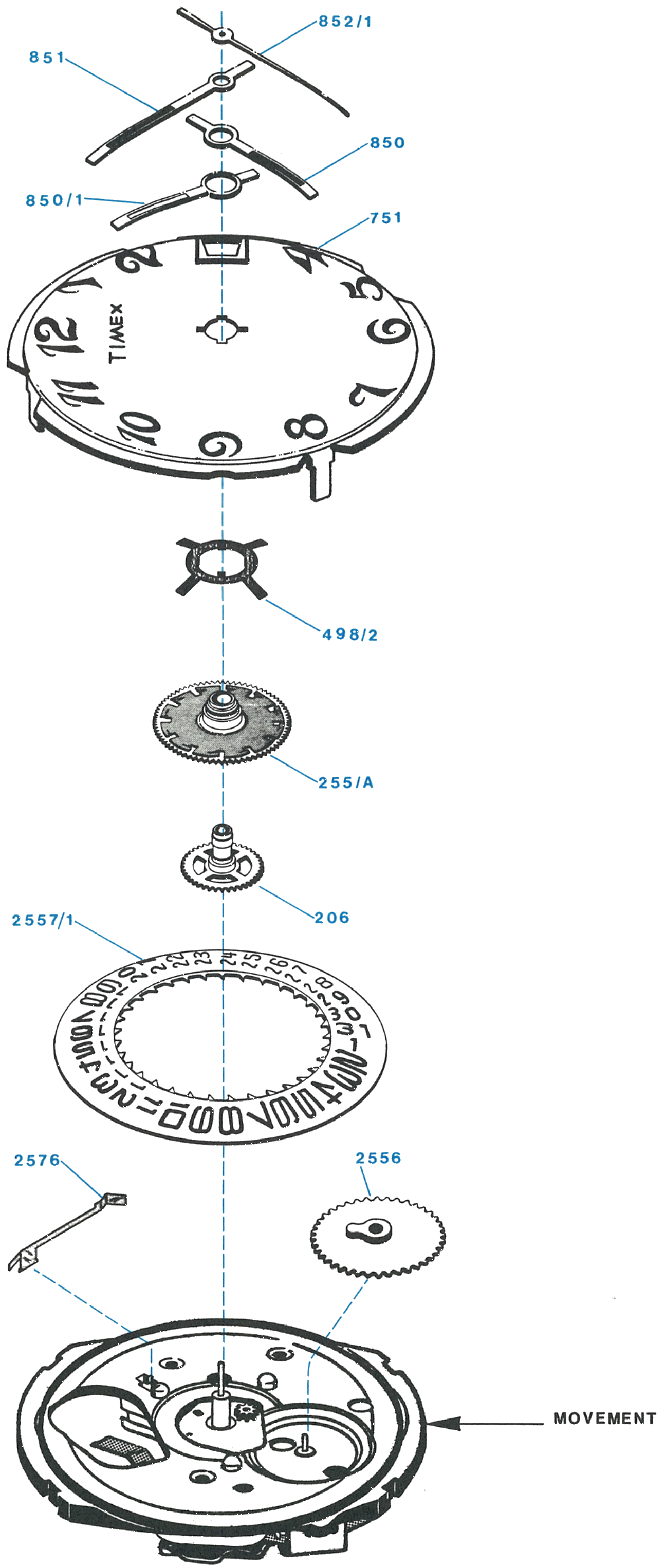
Where the clutch is: The mechanism which permits setting the time difference between the two hour hands is contained in the dial assembly, not in the movement. That is why the dial comes off as an assembly.
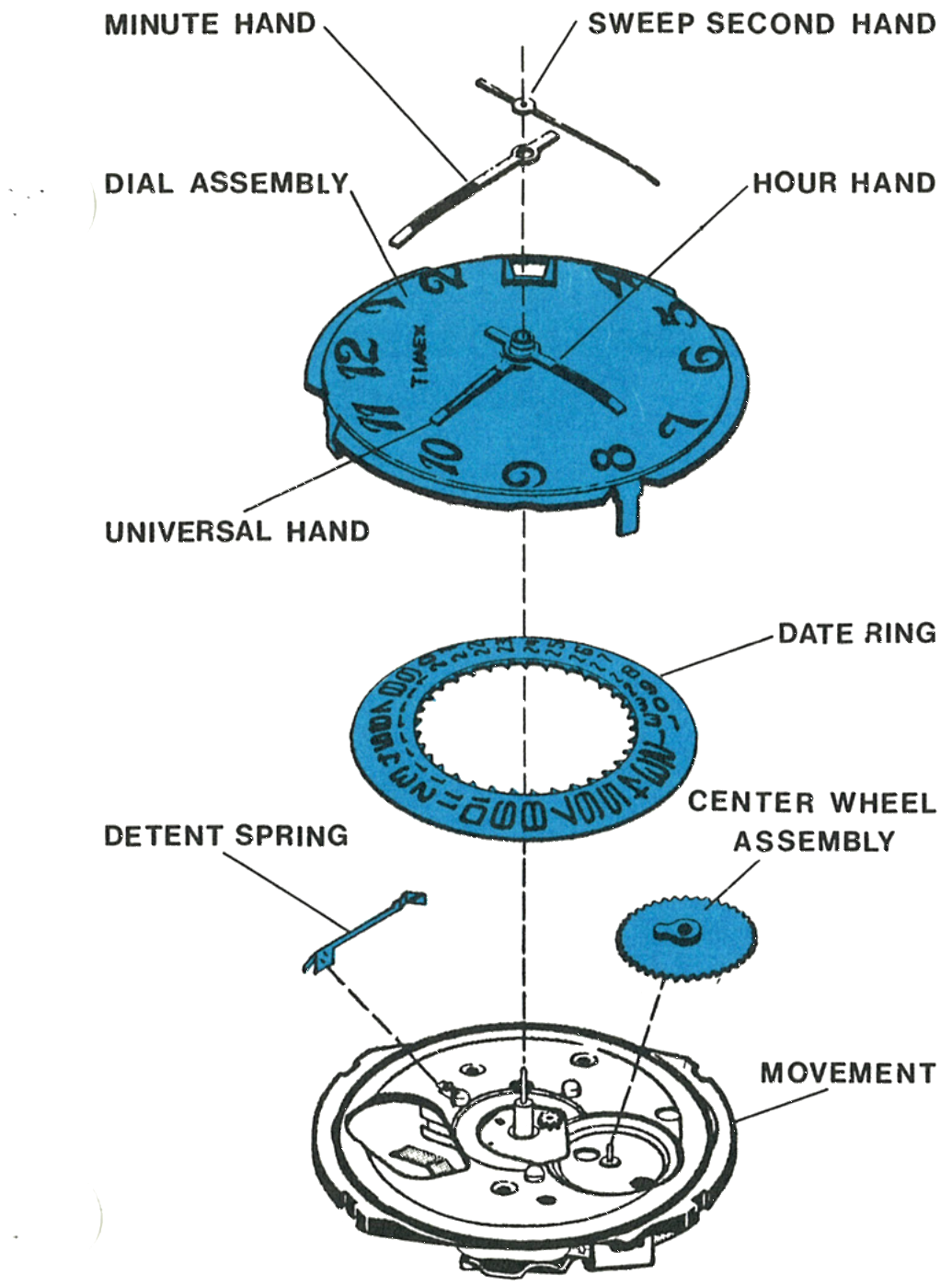
The second hand is called the universal hand, 850/1 in the parts list. It runs on its own hour wheel assembly, 255/A, with a detent washer, 498/2, in place of the plain hour wheel washer of the Model 50.
Exploded View
The universal hand at 850/1 and the hour wheel detent washer at 498/2 are what the zone time feature adds. Everything below them is the Model 50 electronic movement.
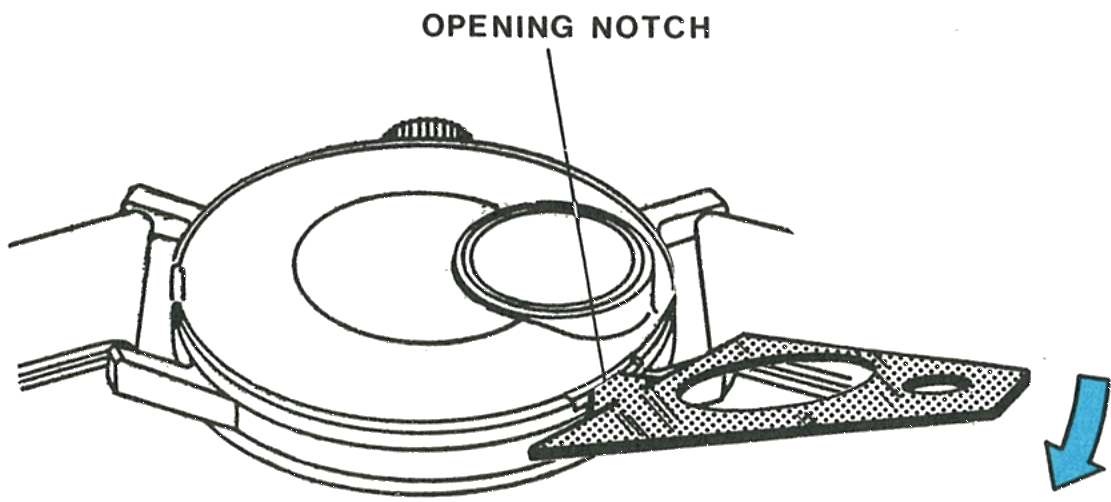
Insert a blade in the opening notch and snap the case back off.
Fig. 65.3 · Figure 1
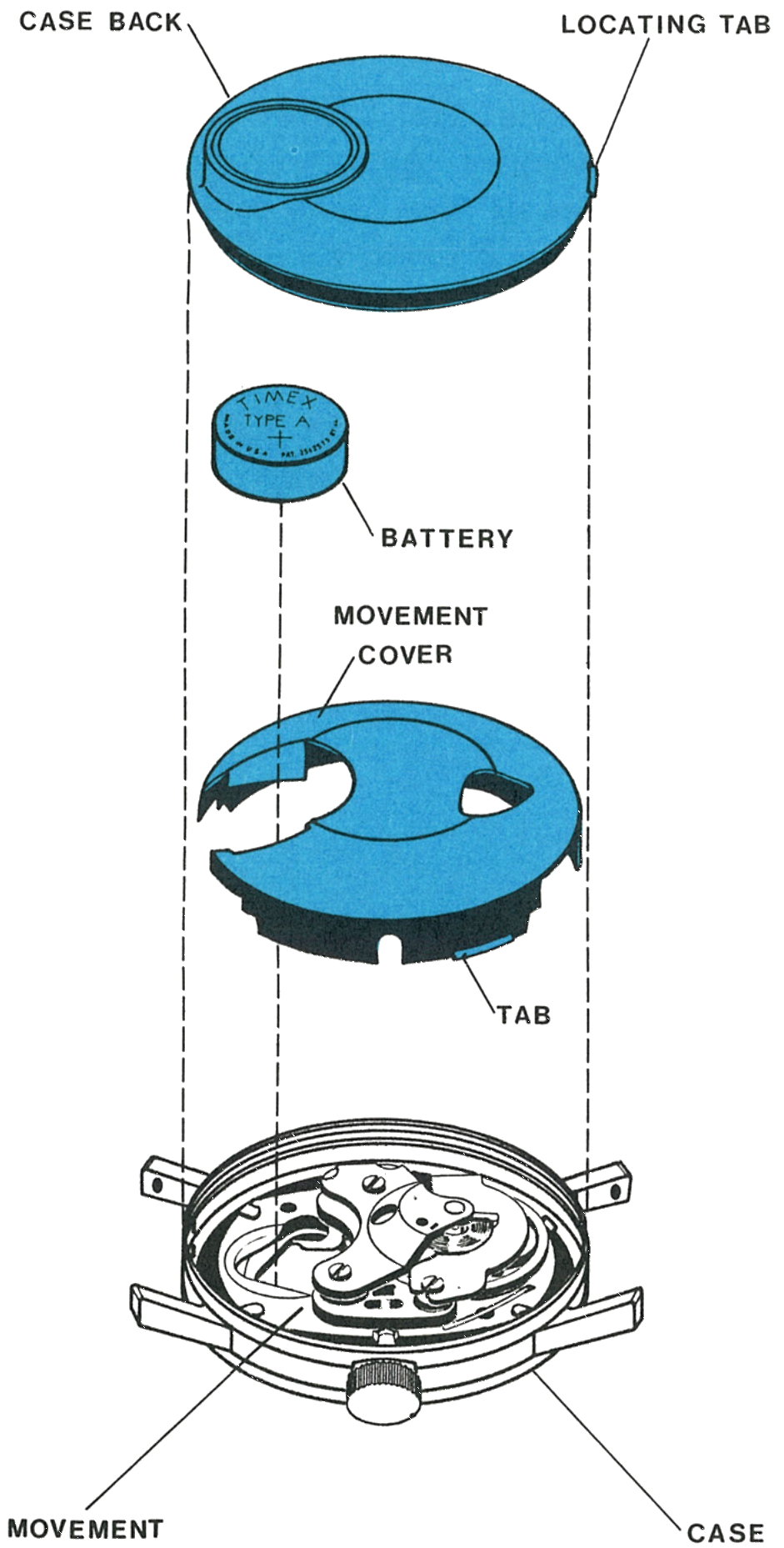
2 · Battery and Cover
Lift out the movement cover with tweezers. Some force is required since it is held in place by two tabs which seat in the bezel. The movement will stay with the bezel since it is removed through the crystal side.
Fig. 65.3 · Figure 2
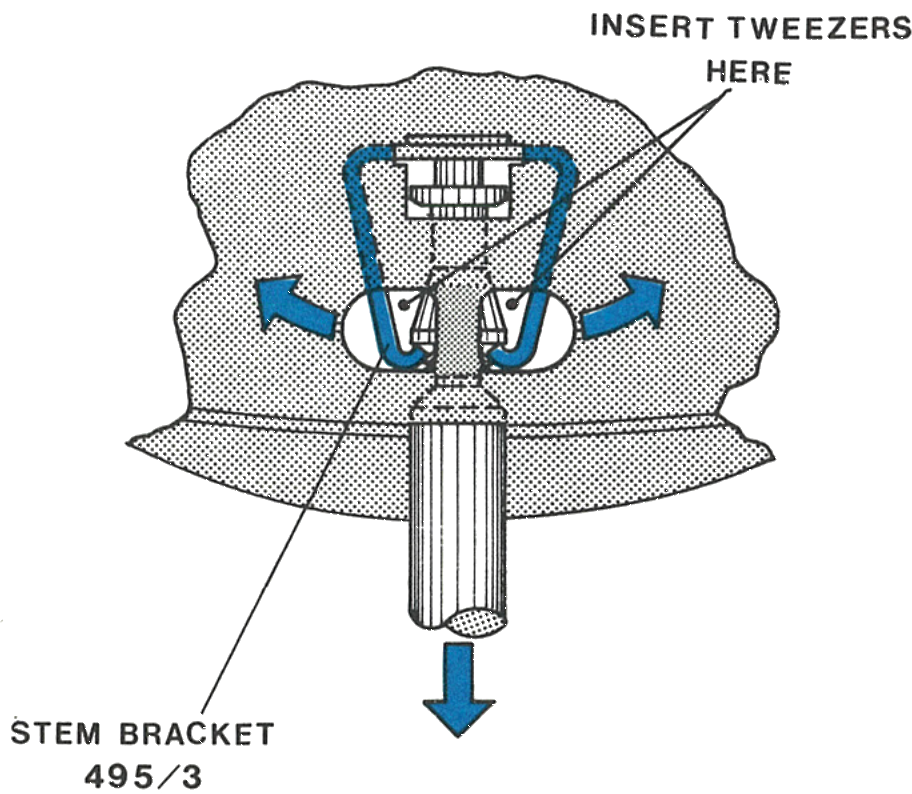
3 · Releasing the Stem
Release the crown and stem assembly by spreading both sides of the stem bracket with tweezers while pulling the stem out of the case.
Fig. 65.4 · Figure 3
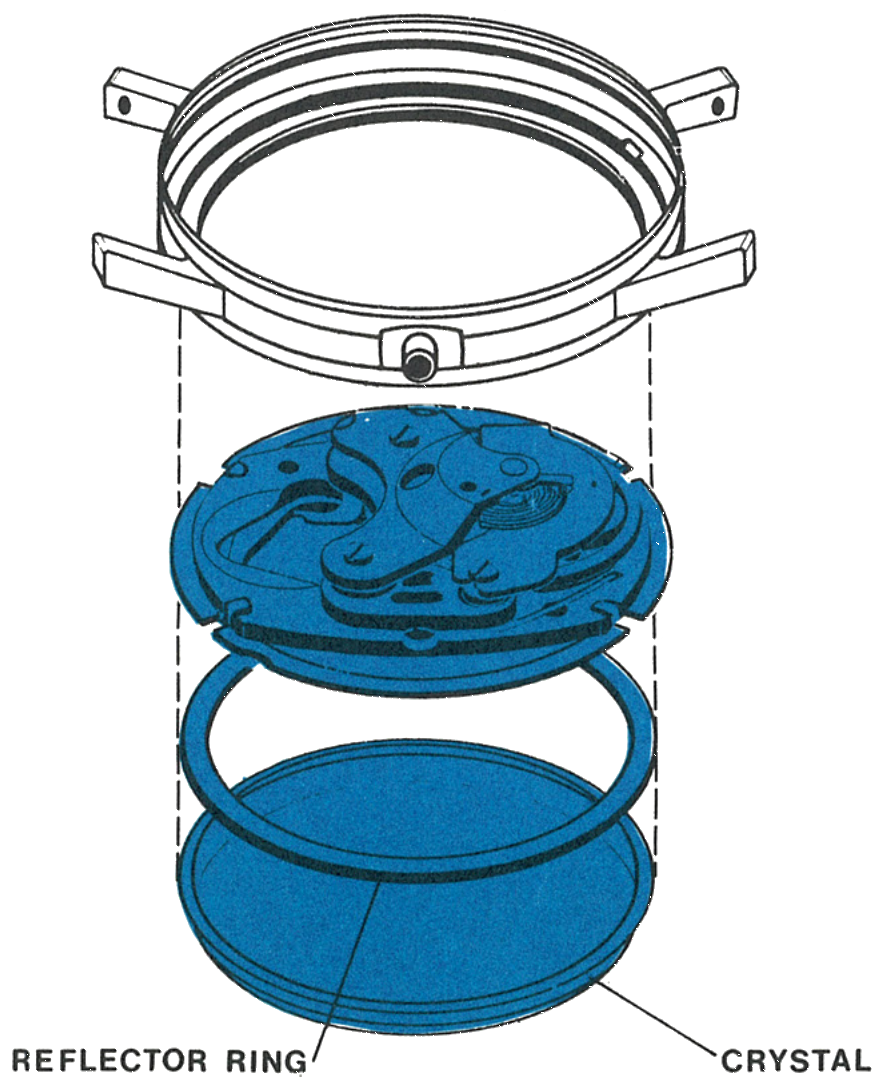
4 · Out Through the Crystal
Remove the crystal with a crystal remover and lift out the reflector ring and movement assembly.
Fig. 65.4 · Figure 4
5 · Removing the Dial Assembly
Remove the sweep second hand and the minute hand.
Straighten four tabs sufficiently to release the dial from the movement while holding the dial in place.
Turn the assembly over and lift off the dial assembly. Note the position of parts under the dial.
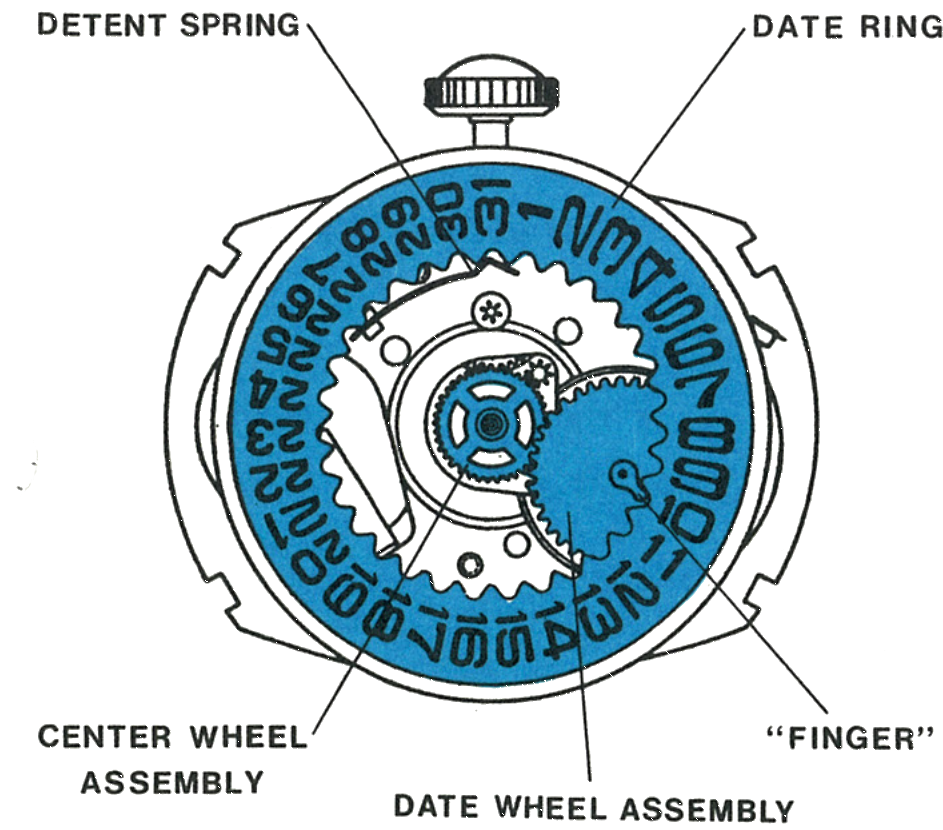
Lift off in order: the date ring, and the detent spring will move over; then the date wheel assembly; then the center wheel assembly.
Note: The clutch mechanism which permits setting the time difference between the hour hands is contained in the dial assembly.
Fig. 65.5 · Figure 5
6 · Under the Dial
The detent spring, date ring, centre wheel assembly, date wheel assembly and the finger which drives the date ring.
7 · The Centre and Date Wheel Posts
Fig. 65.5 · Figure 6
Cleaning & Lubrication
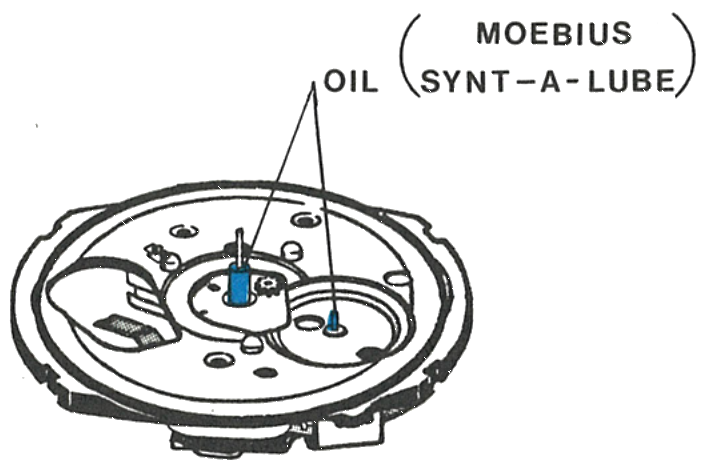
The basic movement, with hands and dial removed, is cleaned and lubricated in the manner described for the Model 50. The Model 65 requires lubrication in addition to that applied in the basic movement.
Caution: Extreme care must be exercised when cleaning cases, dials, hands, special rings and so on, which may contain materials other than metal, because paint, lacquer and plastic finishes can be damaged by standard watch cleaning solutions.
1 · A · The Posts
Fig. 65.6 · Figure 7
2 · The Date Ring and Detent Spring
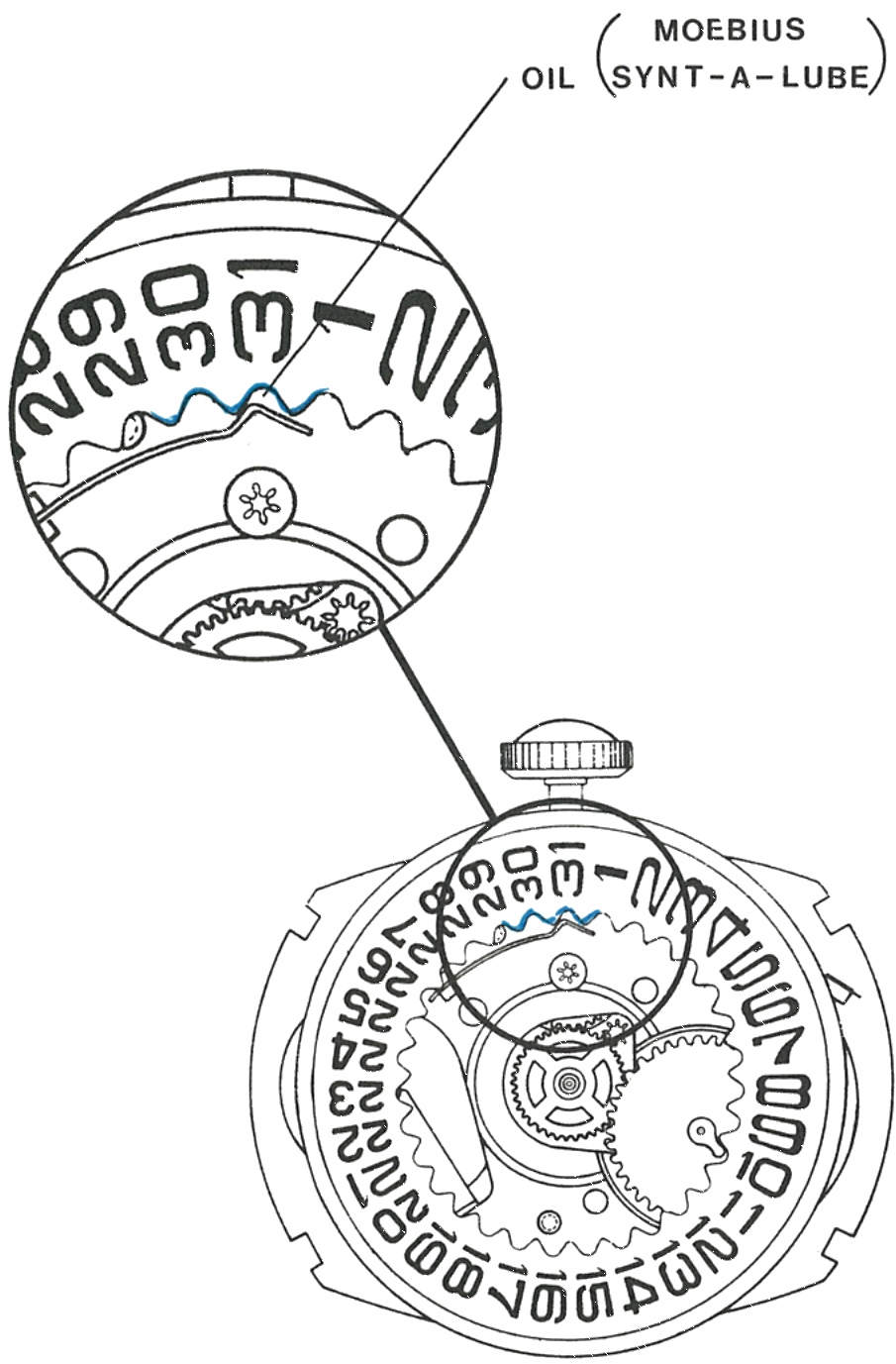
During reassembly, apply non-spreading watch oil to three teeth of the date ring and at the end of the detent spring where it engages the date ring.
The dial rest has been coated with a solid film lubricant and needs no further lubrication.
3 · Assembling the Hands
Turn the crown so the hands rotate counterclockwise and check that the zone hand stops exactly on an hour mark. Turn the hands clockwise and check that the date starts to change at 12 o’clock.
Set the hour hand at the 12 o’clock position and press on the minute hand and second hand. Be sure the sweep hand is below the chamfer on the top of the staff.
Remove the crown and stem. Place the assembly in the bezel, making certain the tabs in the bezel engage the slots in the dial plate.
Place the reflector ring on top of the dial and replace the crystal.
Insert the stem through the bezel and push into place in the movement with a turning motion.
Replace the movement cover, put in the battery and replace the back, being sure to align the locating tab in the notch in the bezel.
Fig. 65.6 · Figure 8
Reassembly
Insert the crown and stem assembly in the movement and push in while rotating to engage the bracket.
Position the center wheel assembly on the center post and engage with the pinion teeth.
Place the date wheel assembly on its post with the finger positioned as shown in figure 6.
Replace the detent spring in the dial rest if it has come loose during cleaning and handling.
Centralise the date ring on the dial rest and use the point of a tweezer to deflect the detent spring to engage the teeth of the date ring, lubricating as noted above.
Place the dial assembly on the movement so the window is in line with the stem, the hour hand is at 11 o’clock and the tabs are aligned in the slots of the dial plate.
Hold the dial in place, turn the assembly over and bend the tabs to hold the dial in position.
1 · A · Insert the crown and stem assembly and push in while rotating to engage the bracket2 · B · Position the center wheel assembly on the center post and engage with the pinion teeth3 · C · Place the date wheel assembly on its post with the finger positioned as shown in figure 64 · D · Replace the detent spring in the dial rest if it has come loose5 · E · Centralise the date ring and deflect the detent spring with a tweezer point to engage its teeth, lubricating as noted above6 · F · Place the dial assembly so the window is in line with the stem, the hour hand at 11 o’clock and the tabs aligned in the slots of the dial plate7 · G · Hold the dial in place, turn the assembly over and bend the tabs
Assembling the hands:
8 · H · Turn the crown so the hands rotate counterclockwise and check the zone hand stops exactly on an hour mark. Turn clockwise and check the date starts to change at 12 o’clock9 · I · Set the hour hand at 12 o’clock and press on the minute hand and second hand, the sweep hand below the chamfer on the top of the staff10 · J · Remove the crown and stem. Place the assembly in the bezel, tabs engaging the slots in the dial plate11 · K · Place the reflector ring on top of the dial and replace the crystal12 · L · Insert the stem through the bezel and push into place with a turning motion13 · M · Replace the movement cover, put in the battery and replace the back, aligning the locating tab in the notch in the bezel
Caution: Since the watch contains permanent magnets, no attempt should be made to demagnetize it.
This guide is based on the original Timex factory service manual for the Model 65 movement.